Key Takeaways
One podcast episode can become many useful assets, but the goal is not to force a fixed quota from every recording.
The strongest repurposed content starts with a clip or idea that can stand on its own and give the audience an immediate takeaway.
A repeatable workflow is faster when clip selection happens while the full episode is being edited, not after the final file is already finished.
Video can often be reused across platforms, but the caption, hook, context, and call to action should be adapted for the destination.
AI can speed up transcription, brainstorming, and first drafts, but captions, quotes, and context still need human review against the original recording.

DELEGATE SMART. SCALE FAST.
The step-by-step guide to reclaim your time and grow with confidence.
A podcast episode takes a lot of work before anyone sees the final upload. Someone has to plan the topic, record the conversation, clean the audio, edit the video, prepare the title, and publish it. In my experience, the biggest missed opportunity is doing all of that work and then treating the full episode as the only piece of content. I work as a Video Editor and Social Media Management Specialist at Smart VAs, and when I repurpose a podcast, I do not start by asking how many posts I can squeeze out of it. I start by asking which moments can stand on their own and still give someone a useful takeaway.
That is what makes podcast repurposing services valuable: one strong conversation can become clips, graphics, written posts, show notes, email content, and other assets without inventing a new idea from scratch every time. The process is simple: review the episode, mark the strongest moments, choose the formats that fit, adapt them to each platform, check the context, and then measure what people actually respond to.

Why Repurpose a Podcast Episode Instead of Only Publishing It Once?
The full episode is important, but not everyone who could benefit from the conversation is ready to watch or listen to 30, 45, or 60 minutes. Smaller pieces give the same ideas more chances to reach people in the format they already use.
From my side of the workflow, repurposing also makes content planning easier. Instead of opening a blank content calendar every week, I can work from ideas that have already been discussed in depth. One episode might give me a practical tip for a Reel, a quote for a graphic, a three-step framework for a carousel, and a story that works as a text post.
This works best when the original episode is already clear and well edited. I see podcast repurposing as the next layer after good post-production, which is why podcast editing and pacing matter before I start cutting social clips.
What Makes a Podcast Moment Worth Repurposing?
I look for standalone segments that deliver immediate value. The strongest moments are usually a clear piece of advice, a personal story, a useful explanation, a strong opinion, or an insight that makes the viewer think, 'That is exactly what I needed.'
My main test is simple: if someone sees this clip without watching the rest of the episode, will it still make sense? Earlier in my work, one of the mistakes I made was choosing a clip that sounded good but depended too much on context from another part of the conversation. Now I pay more attention to whether the clip has enough setup and a complete thought.
Does Every Episode Need to Produce the Same Ten Assets?
No. I would rather use one strong clip than force four weak ones. The ten formats below are a framework, not a quota. Some episodes naturally give me several short videos and quotes. Others have one excellent moment and are better used for a deeper written post, newsletter, or show notes. The quality of the source idea matters more than the number of assets.
How to Repurpose 1 Podcast Episode into 10 Social Assets
1. Short-Form Video Clips
Short-form video is usually the first asset I look for because it lets the speaker's delivery, expression, and tone do part of the work. I choose a clip that can stand alone, then tighten it around one idea.
My usual working target is around 30 seconds when the idea allows it. I want a clear hook, clean audio, captions placed where they are easy to read, and framing that works on a phone. I usually place captions below the speaker's chin when the composition allows it so they are visible without covering the face.
I do not treat 30 seconds as a platform rule. For example, YouTube currently allows Shorts up to three minutes in square or vertical formats. I keep many podcast clips shorter because I want one clear point, not because the platform requires it.
2. A Quote Graphic
When I hear a line that is concise and complete, I mark it for a quote graphic. I always check the exact wording again before it goes into design. A strong quote graphic should not change the speaker's meaning just to make the line sound cleaner.
I use Canva for this kind of asset, especially when the brand already has reusable templates. The caption should add context instead of repeating the exact sentence on the graphic.
3. A Carousel of Key Takeaways
Carousels work well when the speaker gives several connected takeaways, steps, mistakes, or lessons. I turn the first slide into the main problem or promise, then keep each following slide focused on one point. If the idea is too simple, I do not stretch it into six slides just to have a carousel.
4. A Standalone Text Post
Sometimes the best podcast moment does not need video at all. I can take one insight and rewrite it as a short text post that keeps the speaker's original point but makes the idea easier to read in a feed. This is especially useful when the value is in the wording or story rather than the visuals.
5. A Behind-the-Scenes or Story Post
I only use this format when the source actually gives me something real to work with. That might be a story the guest told, a lesson behind the episode, or approved context from the recording process. I would not invent a behind-the-scenes angle just because the content calendar needs variety.
6. An Audiogram or Audio Highlight
For audio-first episodes, an audiogram can give a strong moment a visual treatment without pretending there is video footage. I pair the audio with simple motion, cover art, or a waveform and add accurate captions so the message still works with the sound off.
7. Podcast Show Notes
Show notes are one of the most useful support assets because they organize the episode for people who want the main topics, guest details, links, and takeaways in one place. I have worked with show notes as part of podcast workflows, and I treat accuracy as part of the job, not a final extra step.
A podcast show notes VA can help review the transcript, organize timestamps, prepare summaries, check links, and format the episode details. The final information still needs to match what was actually said and what the client approved.
8. A Short Email or Newsletter Segment
I have also repurposed podcast material into emails and newsletters. The best approach is not to paste the episode description into an email. I pull one useful lesson from the conversation, explain why it matters, then give the reader a reason to listen if they want the full discussion.
9. A Blog Post or Search-Friendly Article Outline
A transcript can also become source material for a blog or article outline, especially when the episode answers a specific question. I would not publish a lightly cleaned transcript and call it an article. The content still needs structure, fact checking, headings, and explanation for a reader who was not part of the original conversation.
10. A Short Promotional Post Linking Back to the Full Episode
The promotional post connects the smaller assets back to the original episode. I usually lead with the problem, question, or strongest benefit instead of simply writing 'new episode is out.' The goal is to make the full episode feel worth the click.
A Real Example of How One Episode Can Expand
On one podcast workflow I worked on, the source recording became long-form and short-form videos, static quote graphics, carousels with several takeaways, a LinkedIn newsletter, email graphics, written posts, show notes, thumbnails, and promotional content. That is the part of repurposing I like most: one conversation can support several channels without asking the host to record ten separate ideas.
That kind of connected content workflow is also visible in Smart VAs client Steph Bolton, whose team supports her with podcast editing and video reels alongside other business tasks. For me, that is a practical example of how podcast content can become part of a wider production system instead of staying as one isolated upload.
What Is the Best Podcast Repurposing Workflow?
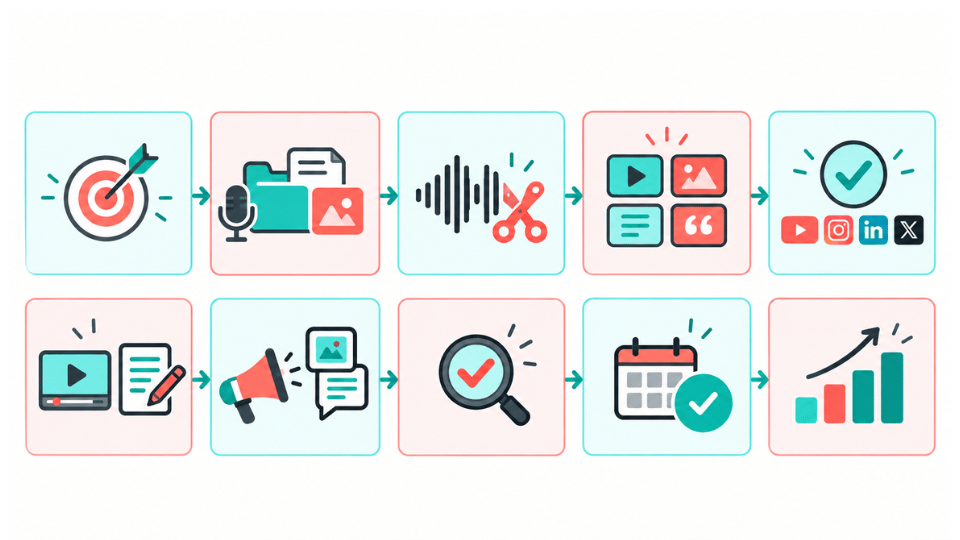
My workflow starts before the final episode is completely finished. While I am editing the full recording, I am already marking timestamps for the strongest moments. That saves me from watching the entire episode from the beginning again just to hunt for clips later.
Confirm the episode goal, audience, and main topic.
Collect the final recording, transcript, guest details, episode title, and brand assets.
Edit the full episode and mark strong moments as I go.
Group those moments into clips, quotes, frameworks, stories, and promotional angles.
Choose only the assets that genuinely fit the episode and the active channels.
Edit the video/audio assets and draft the written assets.
Adapt the caption, hook, context, and CTA for each platform.
Double-check captions, quotes, names, and context against the original recording.
Send the batch for approval, then organize or schedule the final assets.
Review performance so the next episode gets easier to repurpose.
What Tools Do I Use?
My regular toolset includes CapCut for editing, Canva for graphics, Google Drive for file organization and handoff, and tools such as Gemini and ChatGPT for brainstorming, first drafts, or organizing ideas. I do not treat AI output as final copy. The recording is still the source of truth, especially for quotes, captions, names, and anything that could change the speaker's meaning.
Why I Double-Check Captions Before Approval
This is one of the simplest habits in the workflow, but it prevents a lot of avoidable problems. Automated captions can miss names, industry terms, accents, or short phrases. Before I send a clip for approval or upload it, I review the captions against the original audio. Accuracy matters more than speed when the content represents someone else's expertise.
How to Choose Which Assets to Publish on Each Platform
I often cross-post the same core video clip when it fits several channels, but I do not treat the surrounding copy as one-size-fits-all. I adjust the caption for the platform, the audience, and the way people are likely to discover or respond to the post.
For LinkedIn, I usually want the post to give more professional context around the clip instead of relying on the video alone. That fits the broader idea behind a LinkedIn content strategy for B2B: the format, message, and business goal should work together.
Current LinkedIn video guidance also recommends getting attention in the first few seconds and adding subtitles for people watching without sound. That matches how I already edit podcast clips: the opening and captions have to do real work.
The same principle applies to brand voice. Even when the video stays the same, I adapt the written copy so the post feels native to the platform while still sounding like the client. A clear review process is one of the ways I protect brand voice when social media work is outsourced.
Common Podcast Repurposing Mistakes I Try to Avoid
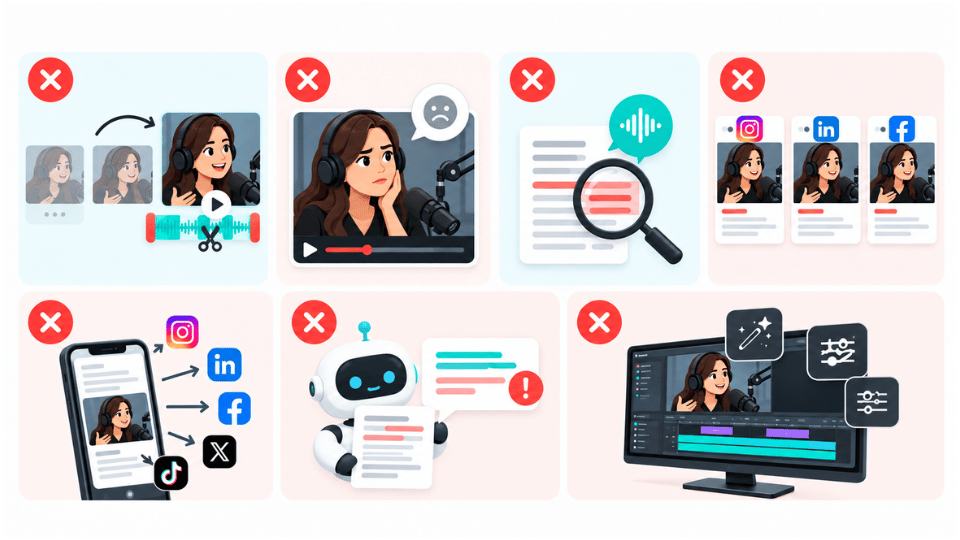
Choosing a clip that only makes sense if the viewer heard an earlier part of the episode.
Keeping a dramatic moment that sounds interesting but gives the audience no real takeaway.
Publishing captions without checking them against the recording.
Trying to force the same number of posts from every episode.
Using the exact same caption on every platform without adjusting the context or CTA.
Letting AI summaries or captions change the speaker's meaning.
Focusing so much on editing effects that the actual topic is weak.
If a clip is almost strong enough but is missing a small piece of context, I sometimes keep the video concise and use the caption to provide the missing setup. I only do that when the clip itself is still accurate and useful. If the missing context changes the meaning, I do not use it.
What Actually Makes a Repurposed Clip Perform Well?
Editing matters, but the topic still comes first. My advice is to prioritize a good clip. The editing helps the audience stay with the video, but the subject has to be relatable, useful, or interesting enough to deserve attention in the first place.
I have worked on a series of podcast-based videos where the topics were strong and the editing was clean and professional. Those videos earned good views and reach on YouTube. I did not take that as proof that every clip will perform the same way. What I took from it was that topic quality and editing quality work together. A weak idea with heavy editing is still a weak idea.
I also think the full episode matters. Clean post-production gives me better material to repurpose, and professional podcast production can support brand authority when the listening experience feels consistent with the business behind it.
How Should You Measure Podcast Repurposing?
I do not judge every asset by the same metric. For a short clip, I care about reach, watch time, completion, saves, shares, and comments. For a carousel or quote graphic, saves and shares can tell me more than raw views. For promotional posts and emails, clicks back to the episode matter more. The goal decides the metric.
| Asset type | Metrics I watch | What it tells me |
|---|---|---|
| Short-form video | Reach/views, watch time, completion, saves, shares, comments | Tells me whether the topic and edit kept attention. |
| Graphics/carousels | Reach, saves, shares, comments | Shows whether the idea is useful enough to keep or pass along. |
| Email/newsletter | Clicks, replies, episode traffic | Shows whether the repurposed lesson created interest in the full episode. |
| Promotional posts | Link clicks, episode visits/listens/views | Shows whether the social asset moved people toward the source content. |
Smart Virtual Assistants
👍🤵
Smart Virtual Assistants 👍🤵
When Should You Get Help With Podcast Repurposing?
The clearest sign is when the show keeps getting published but the promotion happens only when someone has extra time. Another sign is when the host or marketing lead spends hours searching for clips, fixing captions, building graphics, and scheduling posts instead of working on the next episode or the business itself.
Before delegating, I would define the output clearly: which assets are expected, who chooses the moments, who approves the final edits, which platforms matter, how files are named, how revisions work, and what the turnaround should look like. That makes the handoff much easier for everyone.
At Smart VAs, businesses can use video editing support for the clip and post-production side, while social media management support can help with platform-specific captions, scheduling, and ongoing content execution. The exact scope should still be defined around the client's workflow rather than assuming one person automatically owns every part.
The wider benefit of a managed specialist team is that the podcast can connect to editing, design, social media, and other support without forcing one generalist to do everything.
Practical Advice I Would Give Before You Start
Start with the strongest clip, not the easiest clip to edit.
Ask whether the idea makes sense without the full episode.
Keep the hook clear and the audio clean.
Use captions, but check every important word before publishing.
Choose fewer strong assets when the episode does not support ten good ones.
Use the same source idea across channels, but adapt the surrounding caption and CTA.
Keep a repeatable file and approval workflow so repurposing does not become another last-minute task.
For me, the best podcast repurposing workflow is not the one that creates the largest number of posts. It is the one that consistently finds the strongest ideas, protects the speaker's meaning, packages those ideas clearly, and gets them in front of the right audience without creating more chaos for the team.
What if you could reclaim 40 hours this month?
Find out inside this free guide.
Frequently Asked Question
-
Podcast repurposing means taking useful ideas or moments from a podcast episode and adapting them into other formats, such as short clips, graphics, text posts, show notes, emails, newsletters, and articles. The goal is to extend the value of the original conversation, not simply repost the same recording everywhere.
-
It depends on the episode. Ten formats are a useful framework, but I would not force ten assets from every recording. Some episodes have several strong moments; others may only support one or two great clips plus written content. Quality and context matter more than a fixed number.
-
Depending on the scope, podcast repurposing services can include clip selection, video editing, captions, graphics, show notes, social copy, newsletters, scheduling, or performance reporting. I recommend defining the deliverables, approval process, file workflow, and platform responsibilities before the work starts.
-
There is no single ideal length for every platform. I often aim for around 30 seconds when I can deliver one complete idea in that time. If the context needs longer, I keep what is necessary. The clip should be as short as possible without making the message incomplete or misleading.
-
Yes. Audio-only episodes can become audiograms, quote graphics, carousels, text posts, show notes, emails, newsletters, and articles. Video-style clips would need usable video footage or a designed visual treatment instead of pretending the original recording included video.
-
Depending on skills and scope, a video editing VA can identify clip candidates, edit short-form videos, add captions, reframe footage, clean audio, prepare thumbnails, and export files for selected platforms. The best results come when the editor understands the topic, audience, brand style, and approval process.
-
Sometimes the same core video can work across several platforms. In my workflow, I may cross-post the clip but rewrite the caption and context for each destination. I also check current platform requirements before export because framing, length, and publishing options can change.
-
No. AI can help with transcription, brainstorming, clip discovery, and first drafts, but I still review the original recording. Human review is especially important for captions, quotes, context, brand voice, and any content where a small wording change could alter the speaker's meaning.
-
Match the metric to the asset goal. I look at watch time and completion for video, saves and shares for educational posts, clicks for emails and promotional posts, and episode traffic when the goal is to bring people back to the full conversation.
-
Yes. A trained customer service virtual assistant can monitor tickets, answer common questions, manage inboxes, update customer records, handle routine order or appointment questions, follow up, collect feedback, and prepare escalations. Complex technical, legal, security, refund, or management-sensitive cases should move to the appropriate internal owner.
-
Use documented SOPs, brand and tone guidance, QA reviews, ticket audits, coaching, escalation reviews, knowledge management, and customer feedback. I also watch reopen and escalation patterns because they often reveal quality issues that response-time metrics miss. Quality needs its own review process, not just a speed target.
-
Forecast likely spike categories, prepare temporary coverage, update self-service content, create approved response templates, define priorities, confirm escalation coverage, and monitor backlog more frequently. After the spike, review what created the most workload and improve the process so the next peak requires less manual effort.
Brent Kurt A. Flores | Marketing Assistant, Smart VAs

Brent Kurt A. Flores is a Marketing Assistant at Smart VAs, responsible for creating engaging social media content, managing the content calendar, and developing compelling captions and copy aligned with the brand’s marketing goals. He also creates SEO blog graphics and repurposes content across multiple platforms to support content distribution, audience engagement, and brand visibility.