How to Build a Scalable Customer Support Process for a Growing Business
Key Takeaways
A scalable customer support process should define how tickets enter the system, how they are categorized, who owns them, when they escalate, and how quality is reviewed.
The first scaling lever is not always headcount. Better self-service, routing, documentation, and automation can remove avoidable workload before a business hires more people.
Support metrics should trigger decisions. Response time, resolution time, FCR, backlog, escalation rate, CSAT, and customer effort only matter when the team knows what action each metric should drive.
A customer service specialist should work inside a documented process, not become the process. Clear authority, escalation rules, CRM hygiene, and quality standards protect both the customer and the business.
The most scalable support teams use ticket patterns as business intelligence so recurring problems get fixed at the root instead of answered forever.

DELEGATE SMART. SCALE FAST.
The step-by-step guide to reclaim your time and grow with confidence.
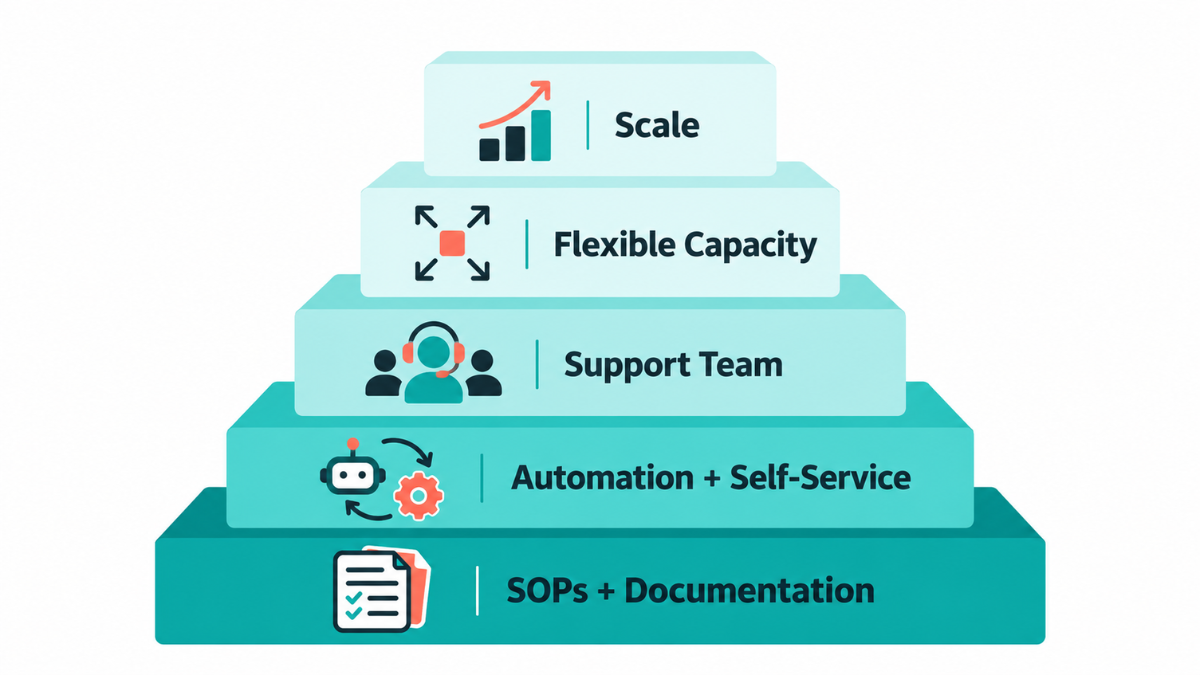
When support volume grows, the answer is not automatically to hire more people. In my work as a Customer Service Specialist, the first thing I look at is the process behind the inbox. I want to know how tickets arrive, how priorities are decided, what I am allowed to resolve, what must be escalated, and where customer information is recorded. A scalable customer support process gives every request a clear path from first contact to resolution. If that path is unclear, adding more agents usually adds more handoffs, more inconsistency, and more chances for a customer to repeat themselves. The goal is to build the process first, then add automation or capacity where the process proves it is needed.
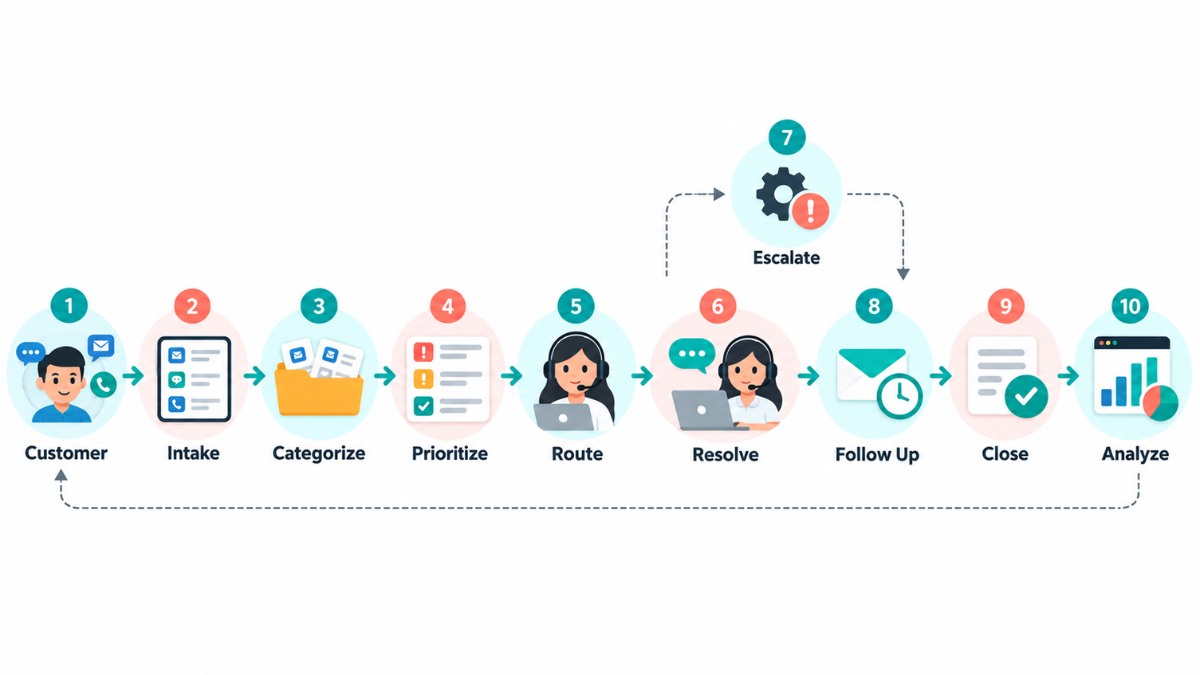
What Does a Scalable Customer Support Process Actually Look Like?
I think of scalable customer support as a system, not an inbox. A ticket should enter through a defined channel, be categorized consistently, receive the right priority, reach the right owner, follow a documented resolution path, and be escalated when it leaves that owner's scope. After resolution, the important details should still be captured so the team can learn from what happened.
This is also why I separate customer support from simply “replying fast.” Speed matters, but a fast answer from the wrong person or an incomplete answer that creates another ticket is not good support. When I help organize support work, I look for the smallest repeatable process that gives the customer a clear next step and gives the team clear ownership.
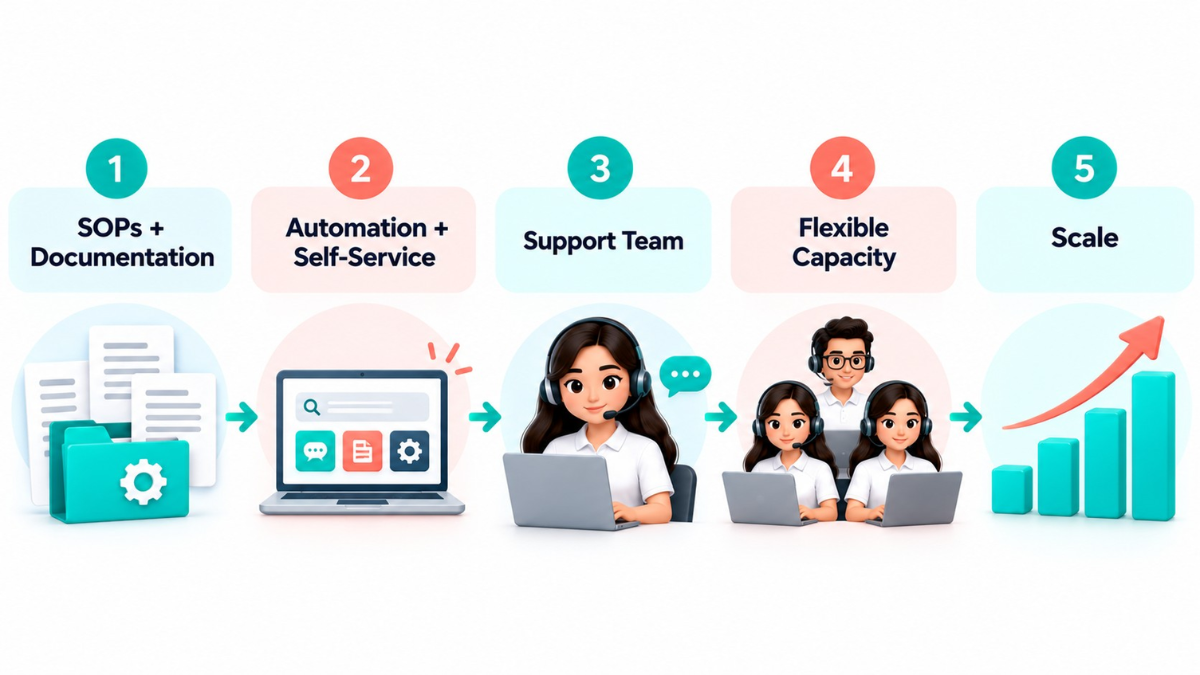
What Should You Standardize Before Ticket Volume Grows?
Before a business scales customer support, I want the basics documented. If those basics only exist in one person's head, growth exposes the gaps very quickly. I start with the support channels, ticket categories, priority rules, ownership, approved responses, access permissions, refund or exception policies, and escalation contacts.
Where customers can contact the business and which channel is the official source of truth.
What categories are used for billing, orders, access, technical issues, complaints, appointments, and general questions.
What counts as urgent and what can wait.
Which issues I can resolve directly and which require approval.
What information has to be recorded in the help desk or CRM before a ticket is closed.
What response standards apply by channel and priority.
Which templates are approved and when a human, custom response is required.
At Smart VAs, that is the difference between dropping a specialist into an inbox and giving that specialist a real operating system. Our customer service specialists can handle customer questions across channels, update records, document issues, and forward urgent cases, but the work is strongest when the business has already defined what “resolved” means.
How Can Self-Service Reduce Avoidable Support Work?
One of the first things I check when tickets become repetitive is whether the customer should have needed to contact us at all. If people repeatedly ask the same question about shipping, access, billing, onboarding, returns, or a common troubleshooting step, that pattern is telling us the information is missing, hard to find, or unclear.
A knowledge base, FAQ, onboarding guide, status page, or clearer website copy can remove that friction. Zendesk's current self-service reporting guidance treats knowledge-base engagement and ticket deflection as measurable parts of support operations. I like that approach because it keeps self-service tied to evidence. I do not want to publish fifty help articles just to say we have a knowledge base. I want to know which questions customers search for, which articles actually help, and which topics still create tickets.
This also connects naturally with the work a CRM Specialist may support. When customer history, ticket context, tags, and follow-up data are clean, the support team can see whether a question is truly new or part of a recurring pattern.
How Should You Build an Escalation Process for Complex Customer Issues?
Escalation is one of the most important parts of a scalable support process because it defines where my responsibility ends and where the next owner begins. I should never have to guess whether I am allowed to promise a refund, troubleshoot a security issue, change an account, or make an exception for an angry customer.
What should an escalation rule define?
Escalation triggers: the exact conditions that move a ticket out of Tier 1.
Escalation owner: the person or team responsible for the next decision.
Required information: screenshots, order number, account details, troubleshooting already attempted, customer impact, and urgency.
Response expectations: when the next owner should acknowledge or act on the case.
Internal handoff: where the handoff is documented and how duplicate work is avoided.
Customer communication: what I tell the customer while the issue is being reviewed.
Escalation closure: who confirms the final resolution and what gets documented afterward.
When I escalate a case, I try to make the next person's first question unnecessary. A weak escalation says, “Customer is upset. Please help.” A useful escalation explains what happened, what I verified, what has already been tried, what the customer needs, and why the issue is outside my authority.
Smart VAs approach: A support specialist should not be expected to solve everything. A scalable process defines exactly when the specialist resolves the issue, when they escalate it, and who owns the next step.
How Do You Maintain Customer Support Quality as Ticket Volume Grows
Volume exposes inconsistency. When I am handling ten similar tickets, I can remember the nuances. When the team is handling hundreds, memory is no longer a quality-control system. I want the answers, tone, exceptions, and handoffs to be supported by documentation that the whole team can use.
Standard operating procedures for recurring issues.
Response templates that save time without forcing every customer into the same script.
Tone and brand guidelines for email, chat, social messages, and phone calls.
QA reviews and ticket audits that look at both accuracy and customer experience.
Coaching when patterns show where a specialist needs more context or authority.
Escalation reviews so difficult cases improve the process instead of disappearing after closure.
Customer feedback and regular process updates.
I also pay attention to how the support relationship itself is managed. Cliff Atfield described valuing the proactive check-ins, care, and accountability he receives from Smart VAs. It is a useful example of the management habit I want around support work: do not wait for the client to notice that capacity, follow-up, or ownership is slipping.
That same principle is why a managed customer support model needs more than extra people. Someone still has to own response standards, QA, escalation rules, and the communication rhythm around the team.
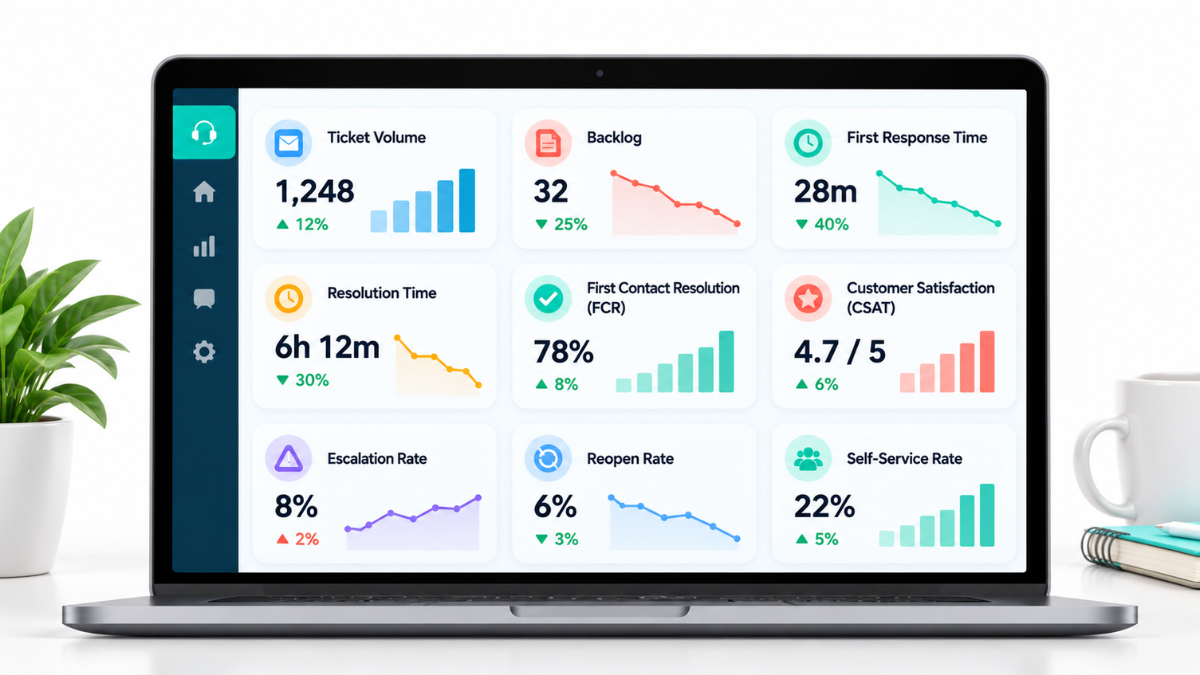
Which Customer Support Metrics Should You Track Before Scaling?
I do not recommend tracking every metric your help desk can produce. I prefer a small set that tells me whether customers are waiting, whether we are actually resolving issues, whether the same problems keep coming back, and whether the team has enough capacity.
Salesforce's current customer service measurement framework separates service-quality, operational, and performance metrics. That is a useful way to think about a support dashboard because a fast team is not automatically a good team, and a satisfied customer is not enough if the backlog is quietly growing.
| Metric | What it tells me | What I would do if it worsens |
|---|---|---|
| First Response Time (FRT) | How long customers wait for the first human response. | Check staffing by hour/channel, routing, queue ownership, and whether priority tickets are getting buried. |
| Average Resolution Time | How long it takes to fully solve issues. | Review handoffs, approval delays, knowledge gaps, and whether one category is creating long cases. |
| First Contact Resolution (FCR) | How often the customer gets a complete answer without another contact. | Improve agent authority, knowledge, routing, or documentation for common issues. |
| Reopen Rate | How often supposedly solved tickets come back. | Audit closure quality and look for incomplete answers or premature closes. |
| Escalation Rate | How often Tier 1 needs another owner. | Check whether scope is too narrow, training is incomplete, or the product/process itself is too complex. |
| CSAT / CES | How customers feel and how difficult support felt. | Read comments, review difficult cases, and locate friction in the customer journey. |
| Backlog / Backlog Age | How much unresolved work is accumulating and how old it is. | Re-prioritize, add temporary capacity, remove avoidable tickets, and address blocked escalations. |
| Ticket Volume by Category | What is creating workload. | Fix root causes, improve self-service, or assign specialist capacity to high-volume categories. |
| Tickets per Agent | How workload is distributed. | Review complexity, scheduling, queue balance, and whether administrative work is reducing support capacity. |
| Self-Service / Deflection | How often customers solve common issues without an agent. | Improve knowledge coverage, searchability, and article quality rather than simply publishing more content. |
How Can You Use Support Data to Prevent Future Tickets?
Support tickets are not only work to clear. They are one of the clearest sources of customer intelligence a business has. If the same problem appears every week, my job is not just to become faster at answering it. I want to know why the ticket exists.
A confusing product feature may need better UX or instructions.
Repeated billing questions may point to unclear pricing or invoices.
Onboarding questions may show where the welcome process is incomplete.
The same troubleshooting request may need a help article or product fix.
Repeated complaints may expose a broken policy or expectation gap.
Frequent order-status tickets may mean proactive notifications are missing.
This is where good ticket documentation matters. If agents categorize issues differently or leave vague notes, the business loses the pattern. When support data is clean, customer service becomes a feedback loop for product, operations, marketing, and leadership.
When Should You Hire More Customer Support Staff?
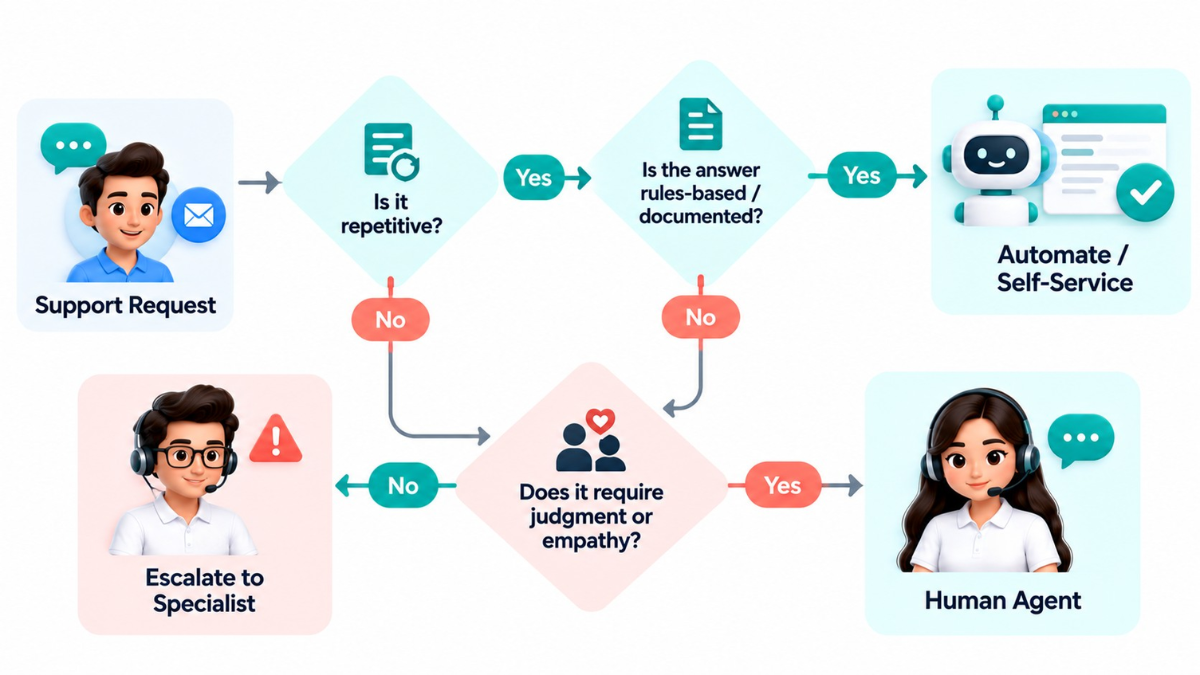
Rising ticket volume does not automatically mean “hire another agent.” I first ask whether the workload is necessary, whether the process is efficient, and whether the current team is spending time on work that should be automated, documented, or handled elsewhere.
I would add capacity when:
Current capacity is consistently exceeded, not just during a short spike.
Self-service and automation have already removed the obvious repetitive work.
The workload is predictable enough to justify ongoing coverage.
Response, resolution, backlog, or quality metrics are deteriorating.
The remaining workload genuinely requires human judgment or empathy.
I would fix the process first when:
Most tickets are repetitive and preventable.
Routing sends customers to the wrong person.
The knowledge base or website does not answer basic questions.
The same issue repeatedly generates new tickets.
Agents are spending too much time copying data, updating records, or chasing internal answers.
When the bottleneck truly is people, the next question is whether the business needs another in-house hire, flexible outsourced coverage, or a hybrid structure. That decision is easier when you first understand how to hire customer service specialists based on the actual channels, complexity, schedule, and authority the role requires.
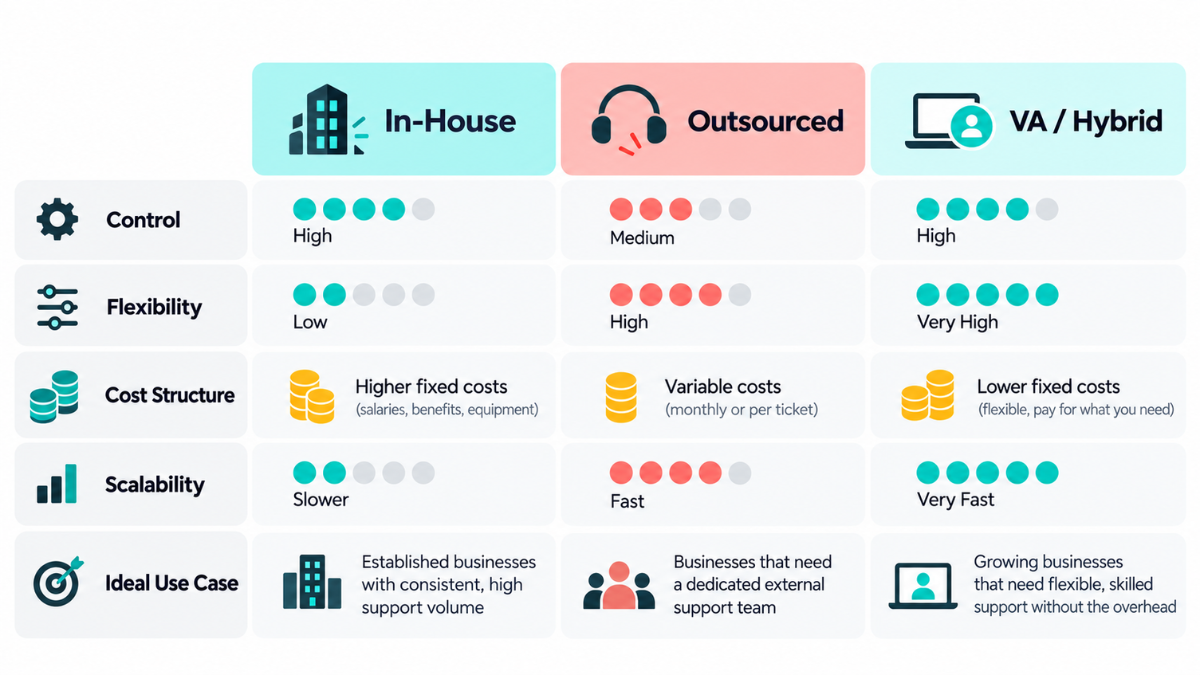
Should You Use In-House Staff, Outsourcing, or a Hybrid Customer Support Model?
| Model | Best for | Main advantage | Main limitation |
|---|---|---|---|
| In-house | Core or highly complex support | Maximum direct control and deep internal context | Higher fixed capacity cost and management responsibility |
| Outsourced | Defined volume or flexible coverage | Flexible capacity without building a full internal team | Requires strong SOPs, access rules, QA, and escalation ownership |
| Hybrid | Growing businesses with mixed issue complexity | Balances internal control with flexible execution capacity | Requires clear ownership between internal and external teams |
In my experience, the model matters less than the clarity around it. An outsourced specialist cannot repair a support process where nobody knows who approves refunds, which customer is high risk, or where technical issues should go. A virtual support team becomes useful when the recurring work is clear enough to delegate and the business still owns the policies and judgment that should remain internal.
How Can a Customer Support Virtual Assistant Help You Scale Without Losing Quality?
A Customer Service Specialist can take meaningful day-to-day workload off the internal team, but I want to be very clear about the role: the specialist is not the process. The specialist operates inside the process.
What I can handle inside a documented support process
Ticket and inbox monitoring.
Ticket categorization and prioritization.
Initial responses and FAQ-based questions.
Order or status questions.
Appointment scheduling and follow-ups.
CRM updates and customer record maintenance.
Ticket documentation and escalation preparation.
Customer feedback collection.
Basic reporting on ticket patterns, backlog, and recurring concerns.
What I should escalate instead of improvising
Technical issues outside my documented scope.
Sensitive or high-risk complaints.
Refunds, credits, or exceptions that require approval.
Legal, security, privacy, or compliance concerns.
Complex product issues that need a specialist.
Cases that require management judgment or could materially affect the customer relationship.
That is why I like to define the roles and responsibilities of a customer service virtual assistant clearly from the start. The point is not to push every customer issue onto one remote person. It is to give recurring support work a reliable owner while keeping clear boundaries around what needs expert or management involvement.
How Should You Prepare Your Customer Support Process for a Sudden Ticket Spike?
Product launches, promotions, outages, seasonal peaks, and unexpected attention can make a support process look healthy one week and overwhelmed the next. I prefer to plan the surge before it happens.
1. Identify the most likely causes of a support spike.
2. Define temporary staffing or overflow capacity.
3. Prepare approved responses for predictable high-volume questions.
4. Update FAQs and knowledge-base content before the event.
5. Set priority rules for urgent, revenue-impacting, or high-risk cases.
6. Confirm escalation coverage and who is available to make decisions.
7. Monitor backlog and queue age more frequently during the spike.
8. Tell customers about delays before they have to ask.
9. Review the spike afterward and update the process while the details are fresh.
I also want the CRM and help desk to stay clean during a surge. When the support team is moving quickly, inconsistent tagging and notes can create problems later. This is where the work of a CRM specialist often overlaps with customer-support operations: accurate records and usable customer history make the next interaction much easier.
Smart Virtual Assistants
👍🤵
Smart Virtual Assistants 👍🤵
How Often Should You Review and Improve Your Customer Support Process?
A support process should change as the business changes. New products create new questions. New policies create new exceptions. Automation can remove one category of work and accidentally create another. I do not treat an SOP as finished just because it has been documented.
| Review rhythm | What I review |
|---|---|
| Weekly | Backlog, urgent escalations, queue bottlenecks, unusual ticket spikes, unresolved blockers |
| Monthly | Top ticket categories, response and resolution trends, repeat contacts, complaint themes, knowledge gaps, QA findings |
| Quarterly | Staffing model, automation, routing, SOPs, escalation authority, tooling, service hours, customer feedback trends |
At Smart VAs, the managed model adds another layer around this work. A Client Success Partner can help keep communication, priorities, workload, and ongoing support coordinated so the Customer Service Specialist is not operating as an isolated freelancer. That is part of the broader Smart VAs managed specialist team approach.
What Is the Best Customer Support Process for a Growing Business?
1. Prevent avoidable contacts.
2. Capture tickets consistently.
3. Categorize and prioritize.
4. Route intelligently.
5. Resolve using documented processes.
6. Escalate exceptions.
7. Collect customer feedback.
8. Measure support performance.
9. Fix root causes.
10. Add automation or capacity only where the data says it is needed.
The principle I come back to: Build the process before you build the team.
That does not mean a growing business needs a perfect help desk before it gets support. It means the business should know what experience it wants customers to have, what decisions belong with the specialist, and what happens when a case leaves that scope. Once those rules are clear, flexible support becomes much easier to scale without losing quality.
What if you could reclaim 40 hours this month?
Find out inside this free guide.
Frequently Asked Question
-
A customer support process is the documented path a customer issue follows from first contact to resolution. It covers intake, categorization, priority, ownership, response standards, resolution steps, escalation, documentation, and closure. A scalable process makes those decisions repeatable so support quality does not depend on one person remembering what to do.
-
Start by documenting the customer journey, common ticket categories, owners, priorities, approved resolutions, escalation rules, and response expectations. Then add self-service, automation, QA, and staffing based on real ticket patterns. I prefer to standardize the process before adding more people because otherwise growth multiplies inconsistency.
-
First remove avoidable work. Improve FAQs and knowledge-base content, route tickets correctly, automate repetitive administrative steps, use response templates where appropriate, and fix recurring root causes. If quality or response metrics still decline after those improvements, the business has stronger evidence that it genuinely needs more human capacity.
-
Hire when existing capacity is consistently exceeded, avoidable work has already been reduced, demand is predictable, service metrics are deteriorating, and the remaining issues require human judgment. I would not hire simply because ticket volume increased for one campaign or because the current process is poorly routed or undocumented.
-
Automate repetitive, low-risk steps such as ticket acknowledgments, routing, tagging, reminders, status updates, knowledge suggestions, and internal notifications. I keep exceptions, emotionally sensitive conversations, high-risk complaints, refunds requiring judgment, and complex troubleshooting under human review. Automation should reduce friction without removing accountability.
-
A useful knowledge base gives customers clear answers to common questions before they open a ticket. It can also help support specialists resolve issues more consistently. The important part is maintaining it. I review search terms, recurring ticket categories, outdated articles, and gaps so self-service reflects what customers are actually asking.
-
Track a balanced set: first response time, resolution time, first contact resolution, reopen rate, escalation rate, CSAT or customer effort, ticket volume, backlog age, and self-service performance. Each metric should have an owner and a response. A dashboard that never changes a decision is only reporting, not management.
-
Customer service is the broader experience of helping customers before, during, and after a purchase. Customer support often focuses more specifically on resolving questions or problems, including technical or product issues. In practice, growing businesses may combine both functions, but the roles, authority, and escalation paths should still be clear.
-
It can be, especially when a business needs flexible capacity for documented, recurring support work. Outsourcing works best when brand voice, access, response standards, escalation rules, QA, and ownership are clear. It is not a substitute for a broken process. The external team still needs a reliable system to work inside.
-
Yes. A trained customer service virtual assistant can monitor tickets, answer common questions, manage inboxes, update customer records, handle routine order or appointment questions, follow up, collect feedback, and prepare escalations. Complex technical, legal, security, refund, or management-sensitive cases should move to the appropriate internal owner.
-
Use documented SOPs, brand and tone guidance, QA reviews, ticket audits, coaching, escalation reviews, knowledge management, and customer feedback. I also watch reopen and escalation patterns because they often reveal quality issues that response-time metrics miss. Quality needs its own review process, not just a speed target.
-
Forecast likely spike categories, prepare temporary coverage, update self-service content, create approved response templates, define priorities, confirm escalation coverage, and monitor backlog more frequently. After the spike, review what created the most workload and improve the process so the next peak requires less manual effort.
Jhosmer Parra | Technical Admin, Smart VAs

Jhosmer Parra is an experienced Admin VA at SMART VAs, specializing in administrative support, process optimization, project management, and staff supervision. He also assists with client onboarding and real estate market analysis. His top priority is to streamline daily operations, improve efficiency, and ensure customer satisfaction.