Key Takeaways
Map the client journey before building automations. A workflow cannot fix an onboarding process that has not been clearly defined.
Use one reliable trigger for each onboarding entry point and check for overlapping workflows before publishing.
Automate repetitive steps such as welcome messages, intake reminders, booking reminders, pipeline updates, and internal tasks, but keep judgment and approvals with the right person.
Test with sample contacts before launch, then have another person test the workflow too. The second set of eyes often catches assumptions the builder misses.
Keep reminders simple and give every sequence a stop condition so clients do not keep receiving messages after they complete the required step.
Monitor workflow enrollment after launch and re-test whenever forms, tags, pipeline stages, calendars, integrations, or message content change.
DELEGATE SMART. SCALE FAST.
The step-by-step guide to reclaim your time and grow with confidence.
Client onboarding can look simple from the outside: send a welcome email, collect information, book a kickoff call, update the team, and get started. In practice, those steps can break quickly when they depend on someone remembering every follow-up. In my work as a GHL Specialist at Smart VAs, the most common problems I see are delayed welcome messages, missing client information, and no clear SOP showing what should happen next.
A GoHighLevel virtual assistant can help turn those repeated steps into a more consistent system. My job is not to automate everything I can find. I map the client journey, identify the right trigger, configure the workflow, test the full path, and monitor the places where a real person still needs to step in. That same process-first approach is important when learning how to use GoHighLevel for your business: the software works best when every automation has a clear job.
I learned this clearly while fixing a client journey that had broken automations and two or more workflows trying to achieve the same goal. One reminder sequence was firing from the wrong setup. I simplified the process, used the correct tag-based trigger, and kept the lead in one reminder workflow until they booked a call. Once the booking happened, the reminders stopped. The fix was not “more automation.” It was better logic.
What Can a GoHighLevel Virtual Assistant Do During Client Onboarding?
A trained GHL virtual assistant can support the operational side of onboarding: documenting the process, building agreed workflows, setting up forms and fields, maintaining pipelines, testing automations, organizing client records, and checking whether a client is stuck. At Smart VAs, our GHL Expert support covers workflows, pipelines, forms, calendars, contact organization, testing, troubleshooting, documentation, and routine GoHighLevel maintenance within the agreed scope.
I also separate GHL work from broader CRM ownership when needed. A business may use CRM Specialist support for database organization, pipeline administration, reporting, or process documentation while a GHL Specialist focuses on the platform-specific build. Clear ownership matters because onboarding touches both the customer journey and the data behind it.
Personally, I have automated welcome emails, lead tagging, lead capture, pipeline movement, reminders, and internal tasks. Some pipeline steps can be automated, while others are better moved manually depending on the business rule. I am comfortable building landing pages, workflows, API or webhook-based connections within scope, and helping with campaign email or SMS setup, but the business still needs to approve the process, messages, client promises, and any sensitive decisions.
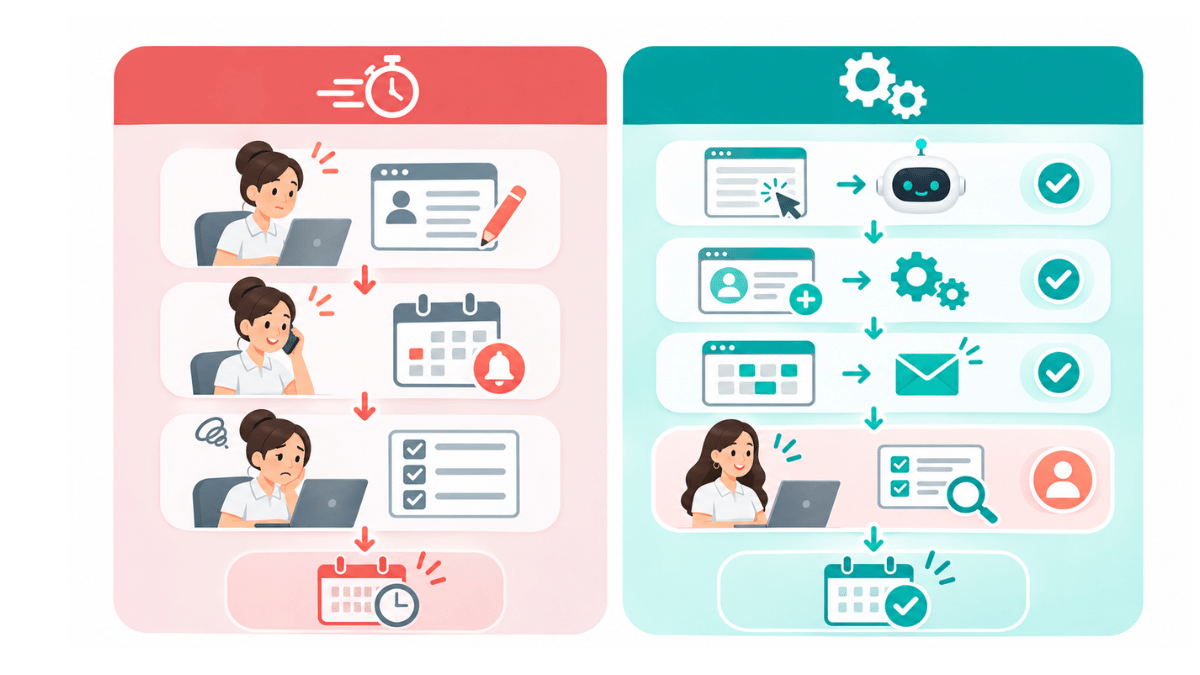
Which Client Onboarding Tasks Should You Automate First?
I start with tasks that are repetitive, rule-based, and easy to verify. If a task depends heavily on judgment, I keep a person in the loop. This is also why the GoHighLevel tasks that can be handed off to a virtual assistant are most useful when the business has already decided what “done” should look like.
Welcome messages and next-step instructions
Once the approved onboarding trigger happens, I can send the welcome email, explain the next step, add the correct tag, update the onboarding stage, and notify the assigned team member. I keep the wording simple. One of my rules is to avoid overly complicated AI-style language or jargon in automated messages because the client should immediately understand what to do.
Intake forms and missing-information reminders
I make sure required fields are set correctly so the form does not look complete when important information is still missing. The workflow should also know when to stop chasing the client. If the intake is finished, reminders should end instead of continuing because the automation was never given a completion signal.
Kickoff scheduling and reminders
For call reminders, I use wait steps so the next message happens at the right time instead of immediately. HighLevel’s official Wait action guidance shows that workflows can pause for a set time, an appointment, a reply, a contact action, or defined conditions. In practice, I keep the logic as simple as possible: wait, remind, check whether the appointment is booked or completed, and stop when the goal is reached.
Internal tasks, notifications, and pipeline updates
I assign tasks to the right team member and move clients to the pipeline stage that reflects what has actually happened. A pipeline should help the team understand the onboarding status at a glance. If the client still needs to submit information, I do not want them sitting in a stage that implies setup is complete.
How I Build a Client Onboarding Workflow in GoHighLevel
Step 1: Map the client journey before opening the workflow builder
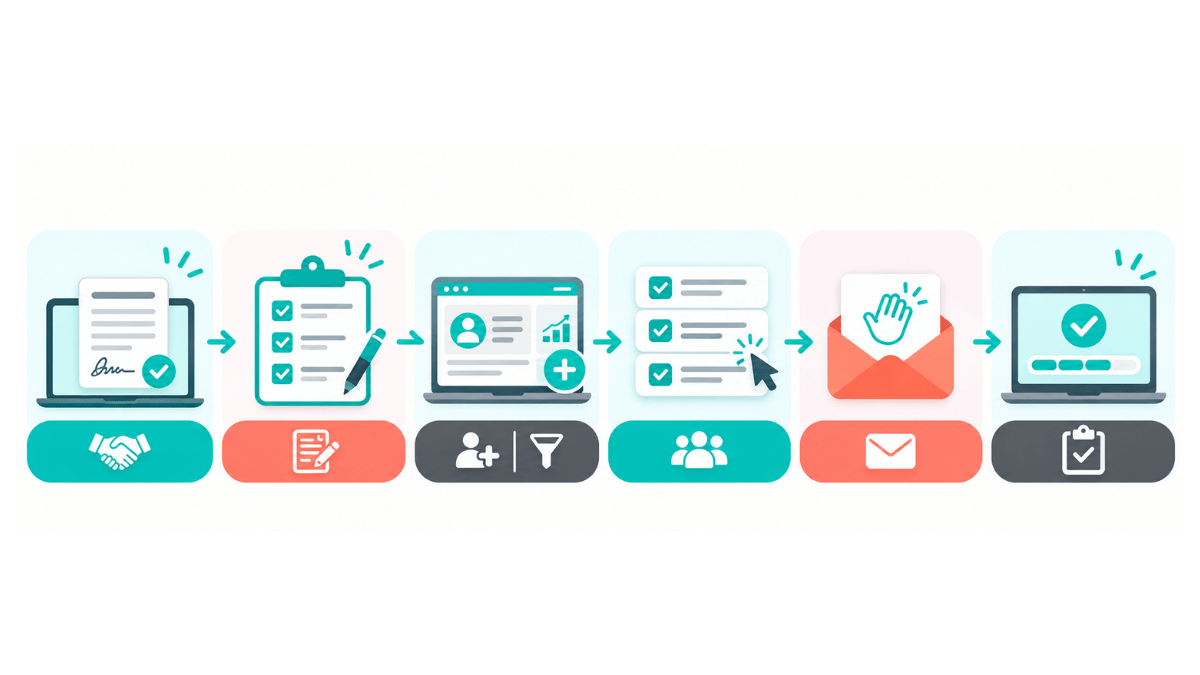
I start by writing the journey in plain language: agreement or payment confirmed, welcome sent, intake pending, intake complete, kickoff booked, setup in progress, handoff complete, active client. Then I define who owns exceptions at each stage. If the client does not know what the correct trigger should be, that is where I have to think through the process and identify the event that actually represents the next step.
Step 2: Choose one reliable trigger
Before I choose a trigger, I check the account for other workflows using the same event. I have seen duplicate messages happen because two automations were listening for the same signal. In one client setup, a tag was the cleanest entry point. HighLevel’s official Contact Tag workflow trigger documentation confirms that adding or removing a specified tag can start a workflow and also warns that overlapping workflows using the same trigger can all activate.
A tag such as “Onboarding Started,” a move into an approved Won or Onboarding pipeline stage, or a completed form can work, but I do not assume one trigger fits every business. The important part is that the event clearly means the person should enter the workflow.
Step 3: Prepare the client record and onboarding pipeline
I check the fields the team actually needs, the assigned owner, the service or client type, and the current onboarding status. I avoid creating extra tags or fields just because they are available. Every field should have a purpose, especially if another workflow depends on it.
Step 4: Configure welcome, intake, and reminder logic
I add the approved welcome message and intake form, then build only the reminders needed to move the client forward. One of the easiest ways to make onboarding feel robotic is to send too many reminders. The workflow should be helpful, not annoying. I also define the exact condition that stops each reminder sequence.
Step 5: Add scheduling and internal handoffs
Once the required information is collected, the workflow can provide the approved booking link, send confirmations, create internal tasks, and notify the person responsible for the next step. I want the internal handoff to be just as clear as the client-facing automation.
Step 6: Build exception handling
I decide what should happen if information is missing, a client does not respond, a booking is cancelled, or the contact enters through the wrong path. Every automation needs an exit or escalation route. I do not want a contact trapped in an endless loop because the workflow never accounted for an exception.
Step 7: Test before publishing
I always test with my own credentials or a dedicated test contact when possible. I also prefer to have another person test the flow because a second opinion can catch something I assumed was obvious. I check the trigger, message text, personalization, form completion, pipeline movement, notifications, timing, and stop conditions.
Step 8: Monitor enrollment after launch
After a workflow is live, I check enrollment and cross-check whether the automation still matches the current onboarding process. A workflow can technically run and still be irrelevant if the business changed its forms, stages, timing, or client journey. Monitoring is part of the build, not a separate afterthought.
How Do You Prevent Duplicate Messages and Broken Triggers?
This is one of the areas where I spend the most troubleshooting time. The first thing I check is whether the workflow has the correct trigger condition and whether another workflow is reacting to the same event. I have fixed automations that did not work simply because the trigger condition was incomplete or pointed to the wrong form.
I also check whether a contact can re-enter, whether an existing tag or pipeline move can fire the same journey again, and whether the “completed” condition is defined. If a lead books the call, finishes intake, or reaches the final onboarding stage, the system should know that the reminder is no longer relevant.
This is the same reason I prefer a simpler account structure when possible. The broader role of a GoHighLevel virtual assistant team is easier to manage when workflows have clear names, documented purposes, and one owner instead of several automations doing almost the same thing.
How I Test and Troubleshoot GHL Onboarding Workflows
When a workflow does not behave as expected, I do not start changing random actions. I trace the journey in order. Did the contact meet the trigger? Did the required form or tag actually update? Did the contact enter the workflow? Did the wait step release them? Did the next action run? Did another workflow change the same field or stage?
My testing checklist usually includes a normal new-client path, an existing contact, incomplete form data, a duplicate trigger, a booked appointment, a cancelled or rescheduled appointment, and the final stop condition. I want to know what happens on the clean path and what happens when the client does something unexpected.
How Do You Know Whether Onboarding Automation Is Actually Helping?
I do not judge success only by whether the workflow says “completed.” I look at whether the client received the right information, whether required forms were completed, whether the kickoff was booked, whether the team received the right task, and whether manual chasing decreased. I also watch for duplicate enrollments, failed actions, overdue steps, and contacts that still need someone to intervene.
The bigger goal is to make the system support the business instead of becoming another system the owner has to babysit. That is also how I think about the role GoHighLevel can play in business growth: automation is valuable when it makes a real process more consistent, not when it simply creates more activity.
I see the same operational principle in John Moore and his broader Smart VAs experience. Streamlined processes and reporting gave his team more room for strategy and client-facing work. That is what I want from onboarding automation too: less repeated chasing, clearer ownership, and more time for the work that needs a person.
What Should You Delegate to a GHL Workflow Expert, and What Should Stay With Your Team?
A GHL virtual assistant can handle a lot of implementation independently once the rules are approved. I can map a workflow, configure triggers and actions, build landing pages and forms, maintain pipelines, test standard scenarios, document the system, and answer client questions about how their GHL setup works. API or webhook work may also be possible when it falls within the specialist’s verified skill and scope.
The business should still retain control over service promises, onboarding timelines, approved client communications, consent requirements, sensitive access, budget, and unusual cases that require judgment. For example, I can build a reminder for an incomplete intake form, but the business should decide how many reminders are acceptable and what to do when a client says they cannot provide a requested item.
Common Mistakes I Avoid When Automating Client Onboarding
Automating a process before the business has agreed on the actual onboarding journey.
Using several workflows for one goal when a simpler workflow can handle it.
Choosing the wrong trigger or failing to check other automations that use the same trigger.
Sending too many reminders instead of defining a useful cadence and a stop condition.
Leaving required form fields optional when the workflow depends on that information.
Skipping end-to-end testing and using a live client as the first real test.
Using overly complicated AI wording that sounds unnatural in welcome or reminder messages.
Building automation with no person responsible for exceptions or failures.
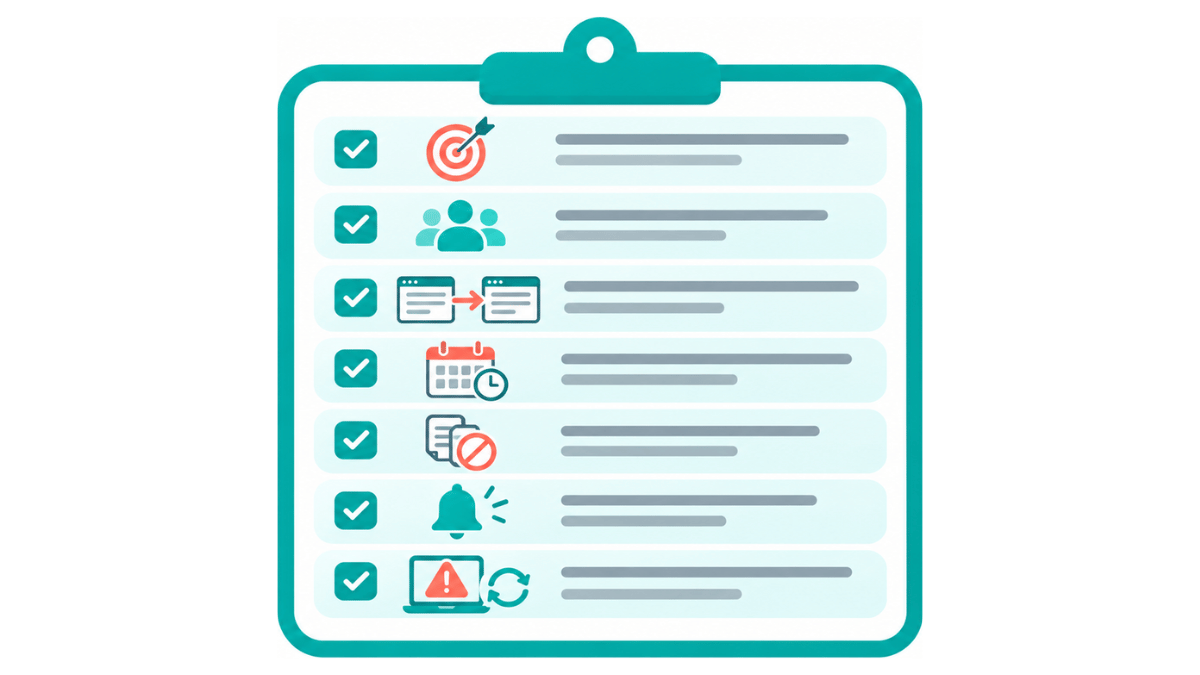
GoHighLevel Client Onboarding Automation Checklist
☐ The client journey is mapped from onboarding trigger to active-client handoff.
☐ The entry trigger represents a real new-client event.
☐ Other workflows using the same trigger have been checked.
☐ Required fields and missing-data rules are defined.
☐ Welcome messages, intake forms, booking links, and reminders are approved.
☐ The workflow has clear stop conditions after intake, booking, or completion.
☐ Internal tasks and notifications have named owners.
☐ A test contact has completed the full success path.
☐ A second person has tested the workflow where practical.
☐ Likely exceptions and duplicate-entry scenarios have been tested.
☐ Account access is limited to what each person needs.
☐ Someone is responsible for reviewing failures and maintaining the workflow after launch.
Smart Virtual Assistants
👍🤵
Smart Virtual Assistants 👍🤵
Getting Started With a GoHighLevel Virtual Assistant
Before I start automating onboarding for a client, I want to see the existing process, the forms and fields being used, the pipeline, the messages the client has approved, and the point where the business considers onboarding complete. If none of that is documented yet, I map it first.
The technical skill matters, but I think logical thinking matters just as much. A GHL Specialist has to be able to picture the customer journey, identify the event that should start each automation, understand where another workflow might conflict, and know when a human should take over.
Client onboarding automation works best when it feels simple from the client’s side even though there may be several actions happening behind the scenes. My goal is not to make the workflow impressive. It is to make it reliable, understandable, and easier for the team to maintain.
If your onboarding is still being managed through manual welcome emails, repeated follow-ups, disconnected forms, and reminders someone has to remember every time, a GoHighLevel virtual assistant can help turn the approved process into a system your team can actually use.
What if you could reclaim 40 hours this month?
Find out inside this free guide.
Frequently Asked Questions
-
A GoHighLevel virtual assistant can support workflow setup, forms, fields, pipelines, reminders, testing, documentation, and ongoing monitoring. The exact scope depends on the specialist’s skills, account access, and the business rules the client has approved.
-
A VA can automate repeatable steps, but onboarding should still include human review for client-specific questions, approvals, unusual situations, consent decisions, and service commitments. Automation should support the relationship, not remove the people responsible for it.
-
Start with simple, repeatable steps such as an approved welcome message, intake form delivery, booking reminders, pipeline updates, and internal notifications. I prefer to get one clean journey working before adding more branches or complex automations.
-
A configured event starts the workflow, then the contact moves through defined actions such as messages, waits, form checks, tasks, notifications, or pipeline updates. Conditions and stop rules control what happens when the client completes a step or needs a different path.
-
Compare your internal skill, workload, account complexity, testing needs, maintenance requirements, and how much ongoing ownership the system needs. Outsourcing can add implementation capacity, while the business should still own requirements, approvals, and sensitive decisions.
-
Ask how they map processes, choose triggers, test workflows, prevent duplicate enrollment, troubleshoot failures, manage permissions, and document what they build. Tool familiarity matters, but logical thinking and problem solving matter just as much.
-
Check that clients receive the right instructions, submit required information, book the correct appointment, move through the pipeline accurately, and stop receiving reminders after completion. Also watch failures, duplicates, overdue steps, and cases requiring manual help.
-
No. Automation is useful for routine instructions, reminders, record updates, and task creation. Personal communication is still important for kickoff conversations, complex questions, exceptions, reassurance, and decisions that need context.
Steven Fernandez | Web Developer, Smart VAs

Steven Fernandez is a Web Developer at Smart VAs, responsible for designing, developing, and managing responsive, user-friendly websites. He is skilled in HTML, CSS, and JavaScript, with experience in UI/UX design, wireframing, and prototyping using Figma. He is also proficient in managing websites through platforms like Joomla and Oncord, with basic SEO knowledge and the ability to handle projects from concept to launch.