Key Takeaways
Start with the business problem you want GoHighLevel to solve, then map your sales process, CRM structure, and pipeline before building automations.
For most businesses, the first useful areas are contacts, opportunities, conversations, calendars, forms, workflows, and one focused funnel.
Your first working system should connect the lead journey: capture an inquiry, organize the contact, assign the opportunity, respond, book the next step, and follow up.
Test every trigger, message, pipeline update, assignment, and booking step before your team depends on the system.
Use AI to improve a process that already makes sense. Do not use it to cover up a sales or follow-up process that is still unclear.
Bring in GHL support when maintenance, overlapping workflows, complex routing, or troubleshooting starts taking time away from sales, service, and business growth.
ARE YOU STILL TRYING TO DO IT ALL?
Discover the SMART way to delegate without losing control—and finally free up your time.
If you are a business owner wondering how to use GoHighLevel, start with one business process you want to improve. In the accounts I work on, I usually begin with the place where the team is losing time or leads: a slow response, a messy pipeline, manual appointment follow-up, or no clear owner for a new inquiry. I set up the business details, CRM, pipeline, calendar, and lead capture around that process first. Then I build one simple workflow, test the full customer journey, and add more automation only when the basics are reliable. GoHighLevel works best when every feature has a job in the business, not when the account is filled with automations no one fully understands.
As a GoHighLevel Specialist, I spend a lot of time simplifying accounts, not adding more to them. I want the owner and team to be able to answer four questions quickly: Where is this lead? What happened already? Who owns the next step? What should happen automatically? If those answers are unclear, I do not consider the system finished. At Smart VAs, the goal is not to build the most complicated account possible. It is to build a system the client can actually trust and use every day.
What Is GoHighLevel and How Can It Support a Business?
What does GoHighLevel actually do?
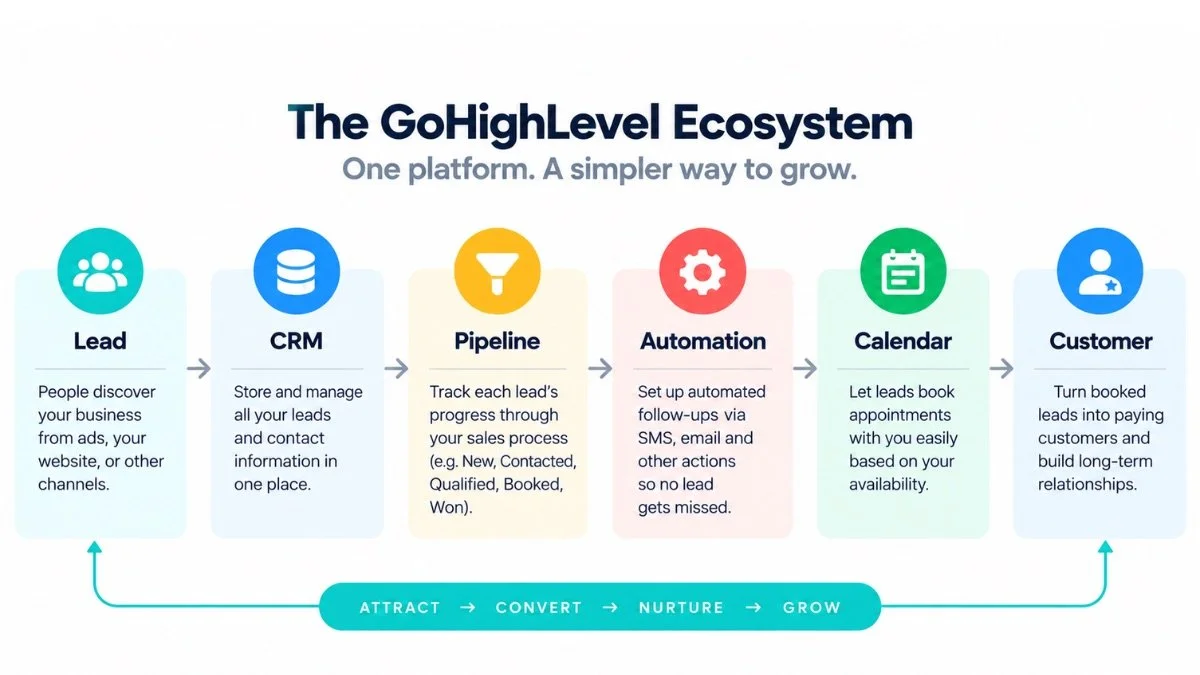
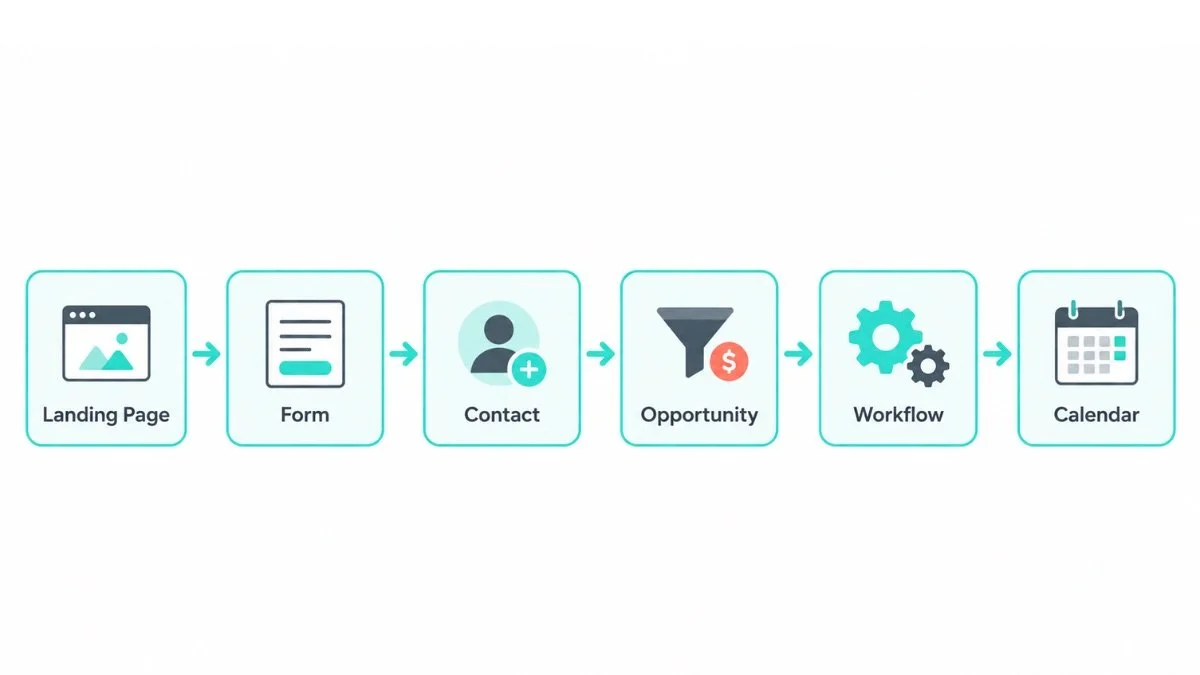
I think of GoHighLevel, also branded as HighLevel, as a connected customer-management and marketing system rather than just a CRM. When I explain it to a client, I usually map it as one working journey:
That connection is what I pay attention to when I am building or cleaning up an account. A form should not just collect data. It should create or update the right contact, place the lead where the team expects to find it, assign ownership when needed, and trigger the correct next step. A calendar booking should not be treated as the end of the process either. I check what happens after the booking, who gets notified, whether the opportunity moves, and whether the customer receives the right confirmation. When those handoffs work, the team spends less time copying information and chasing follow-up manually.
HighLevel’s official platform overview describes the platform as combining CRM, marketing automation, landing pages, scheduling, reputation tools, AI, and other customer-engagement functions in one environment. In practice, I rarely recommend turning everything on at once. I would rather give a client a smaller setup that handles one lead journey correctly than a large account with features the team is afraid to touch.
What kinds of businesses can benefit from GoHighLevel?
GoHighLevel can make sense for service businesses, coaches, consultants, agencies, local businesses, and sales teams that need CRM plus marketing automation. From what I see in client accounts, the strongest fit is usually a business with a repeatable lead or appointment process that is becoming harder to manage manually. If inquiries are coming from several places, follow-up depends on memory, or the owner cannot quickly see what is happening with leads, that is where a connected system starts becoming useful.
What can your business manage inside GoHighLevel?
Contacts and CRM records
Opportunities and sales pipelines
Forms and surveys
Calendars and appointment booking
Funnels and websites
Email and SMS communication
Workflows and automation
Reputation and review processes
AI-assisted conversations, content, funnels, and workflows
Reporting and activity tracking
What Should Your Business Set Up Before Using GoHighLevel?
Before I build anything in GoHighLevel, I ask the business owner or team what is actually breaking down now. Are leads sitting too long without a reply? Are appointments being confirmed manually? Does the team use different definitions for a qualified lead? Are opportunities moving through the pipeline consistently? At Smart VAs, I use those answers to shape the account. I do not start with workflows just because automation is available. A CRM cannot organize a sales process no one has defined, and automation only repeats whatever process you give it, including the messy parts.
What business information should you prepare?
Business name, address, contact details, and time zone
Primary domain or subdomain you plan to use
Sending email details and the inboxes your team will monitor
Phone and SMS requirements
Business hours and appointment availability
Team members, roles, and permissions
Payment processor details if payments are part of the customer journey
What should you decide about your sales process first?
I usually ask the client to describe the sales process in plain language before we translate it into GoHighLevel. Where do leads come from? What makes someone worth following up with? Who owns the lead? What has to happen before an appointment, proposal, or payment? That conversation tells me what the pipeline stages, fields, notifications, and automations actually need to support. It also stops the account from becoming a storage place for information that nobody uses.
Why should you plan your CRM before building workflows?
Because automation repeats your process at scale. I have seen accounts where the workflow was technically running, but the underlying CRM had duplicate fields, overlapping tags, vague stages, and no consistent owner. That creates faster confusion, not better operations. My approach is to map the CRM first, clean up what the team does not need, and automate only the steps we can explain clearly from start to finish.
How Do You Set Up GoHighLevel for Your Business the First Time?
How do agency accounts and sub-accounts work?
For a business owner, keep the hierarchy simple. An agency account is the higher-level environment used to manage multiple client or business locations. A sub-account, sometimes called a location, is where the day-to-day CRM, contacts, funnels, calendars, conversations, and workflows live. If you are using HighLevel for one business, most of your work will happen inside that business’s sub-account. You do not need to master the agency-level tools before your own lead process works.
How should you configure business details and user permissions?
I set the business profile, time zone, hours, users, and permissions before several people start working in the account. I also document who owns the sending setup, calendar connections, payment settings, and key integrations. At Smart VAs, that documentation matters because ongoing support should not depend on one person remembering how an account was built. If priorities change or another specialist needs context, the setup should be understandable without reverse-engineering it from scratch.
What integrations should you connect first?
I start with the connections required for the first working lead journey: usually the calendar, email, phone or SMS setup, and a payment processor only when payment is part of that journey. I do not connect tools just because the integration exists. Every connection creates another place to test and maintain. I would rather get lead capture and follow-up working reliably first, then add integrations when the business has a clear use for them.
How Do You Navigate GoHighLevel Without Getting Lost in the Dashboard?
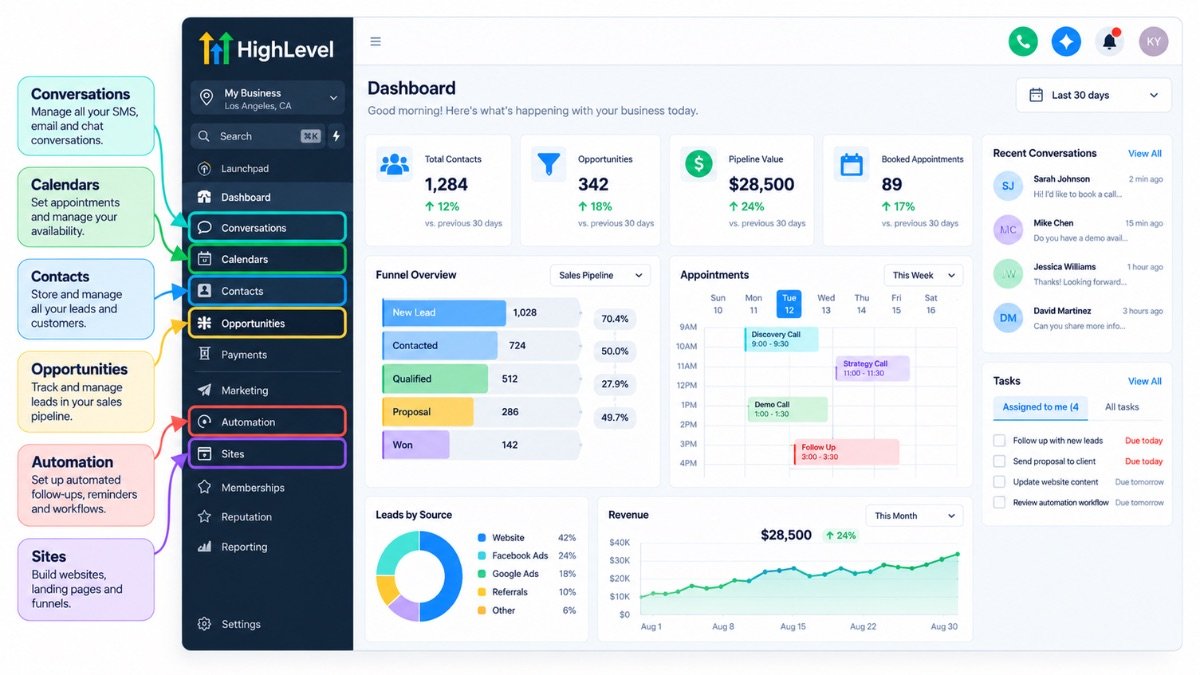
The exact labels and menu layout can change as HighLevel updates the platform, but I do not teach clients to memorize every menu. I show them the areas that affect their daily work first: contacts, opportunities, conversations, calendars, forms, workflows, funnels, and reporting. Once the team understands how a lead moves through those areas, the rest of the dashboard becomes much easier to learn.
| Priority | Area | What I use it for |
|---|---|---|
| 1 | Contacts | Customer and lead records, custom fields, tags, activity |
| 2 | Opportunities | Pipeline stages, deal status, ownership, movement |
| 3 | Conversations | Email, SMS, and message history with contacts |
| 4 | Calendars | Availability, bookings, confirmations, reminders |
| 5 | Forms / Surveys | Lead capture and intake data |
| 6 | Automation / Workflows | Triggers, actions, waits, branches, follow-up |
| 7 | Funnels / Sites | Landing pages, forms, offers, thank-you steps |
| 8 | Reporting | Activity, lead flow, campaign and sales visibility |
How Do You Set Up the GoHighLevel CRM Around Your Sales Process?
For business owners looking for a practical GoHighLevel CRM tutorial, this is where I would spend the most time first. When I open a CRM, I want the contact record to tell me who the lead is, where they came from, what has already happened, who owns the next step, and where the opportunity sits in the sales process. If the team still has to search through messages, spreadsheets, or personal notes to answer those questions, the CRM is not doing enough of its job.
How do you add and organize contacts in GoHighLevel?
A contact record should hold information the business actually uses. I am careful with custom fields and tags because they are easy to create and surprisingly hard to clean up later. I add a field when the information helps the team qualify, route, serve, segment, or follow up with a lead. I add a tag when there is a clear reason to use it in filtering, reporting, or automation. If nobody can explain what a field or tag changes, I usually question whether it needs to exist.
How do you create a GoHighLevel sales pipeline?
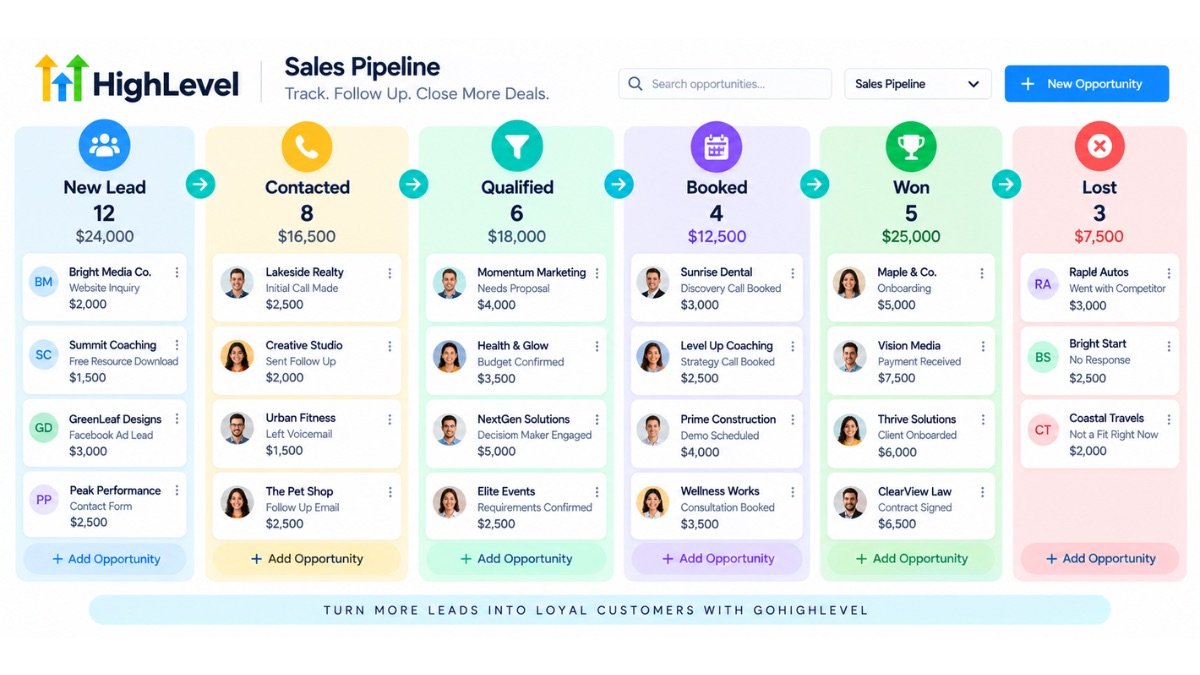
A simple starting pipeline might look like this:
Your stages should reflect real movement in the sales process. One thing I watch for is a pipeline full of labels that describe feelings instead of actions, such as “Maybe,” “Follow Up,” or several versions of “Interested.” I prefer stages that tell the team what has actually happened and make the next action obvious. If the pipeline does not match how the business really sells, people eventually stop updating it, and every report or automation built on top of it becomes less reliable.
How do you assign and track leads?
Decide who owns new leads, how tasks are created, when follow-up is expected, and who moves opportunities between stages. Once those rules are clear, I can automate parts of the handoff without removing accountability from the team. If the CRM is already difficult to organize, a CRM Specialist can help clean up contacts, fields, pipelines, and the structure around the customer journey before more automation is added. As the account grows, recurring GoHighLevel work often includes workflow updates, funnel changes, reporting, testing, and routine maintenance.
What CRM mistakes should businesses avoid?
Creating too many pipeline stages
Using several tags that mean almost the same thing
Adding duplicate custom fields
Leaving leads without a clear owner
Using automation before the pipeline has been agreed
Keeping stages that no longer match the sales process
How Do You Capture Leads Without Creating More Manual Work?
How do forms and surveys capture leads?
Forms and surveys are only the entry point. When I build one, I immediately think about what the business expects to happen after the submit button is clicked. I check the field mapping, whether an existing contact should update instead of duplicate, whether a tag or source should be applied, whether an opportunity should be created, who should be notified, and what follow-up should begin. The form is not finished until the handoff behind it works.
How do calendars fit into lead capture?
Calendars can remove a lot of back-and-forth, but I never test only the booking page. I check availability, appointment type, team assignment, confirmation, reminders, rescheduling, and the connected calendar. Then I book a test appointment and watch what happens inside the CRM. Did the contact update? Did the opportunity move? Did the right person get notified? A booking page can look perfect and still create an operational problem if those steps are wrong.
How should you route leads to the right person?
Routing can be simple at first. I usually start with the clearest ownership rule the business can maintain, then add round-robin, service-based, location-based, or qualification-based routing only when there is a real operational reason. Complex routing is one of those areas where an account can look sophisticated but become difficult to troubleshoot. If I cannot explain the routing logic in a few clear steps, I know it needs another review.
How Do You Build a GoHighLevel Funnel That Connects to Your Sales Process?
When should you use a funnel instead of a full website?
I use a funnel when a business has one main offer and one main conversion goal. A website gives people broader navigation and information, while a funnel is designed around one focused action such as booking a consultation, requesting a quote, registering for an event, or downloading a resource. As an implementer, I care about the page, but I care just as much about what happens after the conversion. A good-looking funnel that drops the lead into the wrong pipeline or sends the wrong follow-up is still a broken funnel.
How do you create your first GoHighLevel funnel?
1. Start with a template or a blank funnel.
2. Build the landing page around one clear offer.
3. Add the form, calendar, or call to action.
4. Connect the submission to the correct contact fields and pipeline.
5. Create the thank-you page or next step.
6. Connect the follow-up workflow.
7. Test the entire path on desktop and mobile.
8. Publish only after the CRM and automation respond correctly.
What should your business test before launching a funnel?
The form submits successfully
The contact is created or updated correctly
The opportunity enters the correct pipeline and stage
Tags and source values are applied as intended
Internal notifications reach the right person
Calendar booking works if included
Automation starts and stops correctly
The mobile experience is usable
How Do You Create a GoHighLevel Workflow for a Real Business Process?
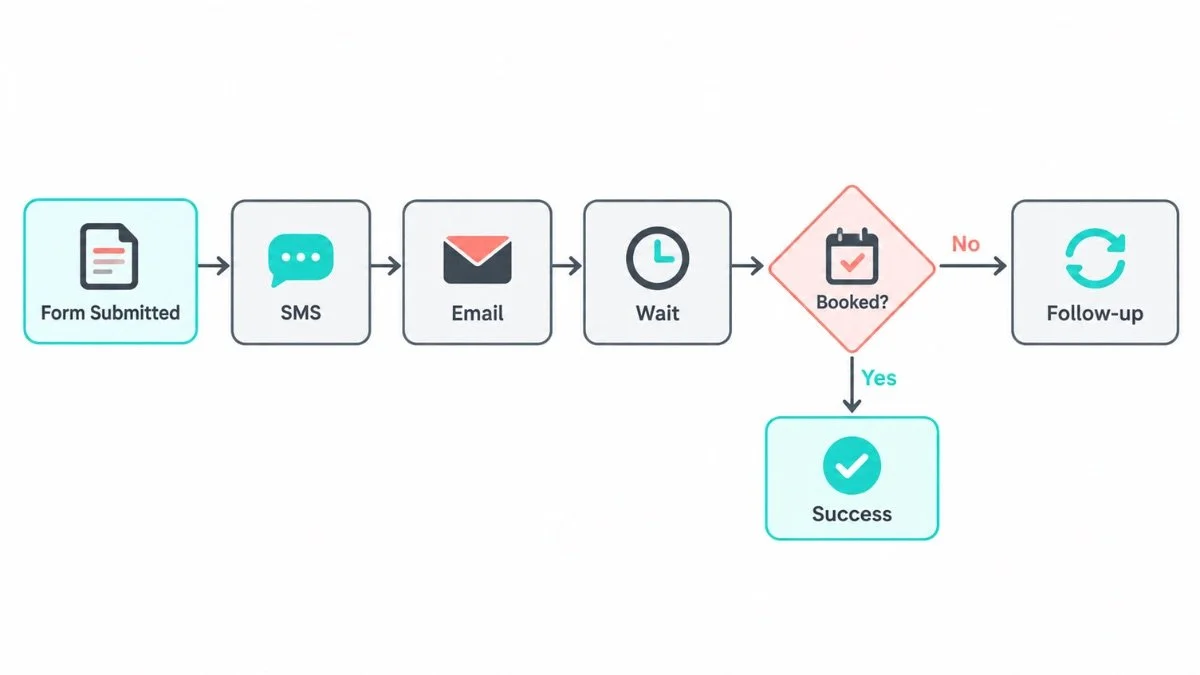
This is where I see beginners overbuild most often. I prefer one workflow that solves one real business problem before we create a library of automations. A common first example is a new inquiry that is not being answered quickly or consistently. HighLevel’s official workflow guide describes workflows as automated sequences that begin with a trigger and then perform actions. In practice, I think through five things before I build: what starts the workflow, who should enter it, what should happen, when it should stop, and what a team member needs to know if something goes wrong.
What is a good first workflow for a business?
A new-lead follow-up is a good first project because the goal is easy to understand:
The stop condition matters just as much as the first message. I have seen follow-up sequences continue after someone replied or booked because nobody defined the exit logic. That is exactly the kind of automation that makes a system feel impersonal and creates cleanup for the team. I want every workflow to have a clear reason to start, a clear reason to stop, and an owner who knows what the workflow is supposed to accomplish.
What can a business automate early?
Appointment confirmations and reminders
Missed-call text-back
Internal notifications for new leads
No-show follow-up
New-customer onboarding steps
Review requests after a completed service
How do you stop conflicting or duplicate workflows?
To avoid conflicting workflows, I document the purpose of each one, use consistent naming, check whether another automation already responds to the same trigger, and define entry and exit conditions before launch. At Smart VAs, I also test with an actual sample contact instead of trusting the diagram on screen. A workflow can look perfectly logical in the builder and still fail because of a filter, field value, timing rule, or contact condition you only notice when it runs.
How Can Your Business Use GoHighLevel AI Without Overcomplicating the System?
AI can help with lead qualification, conversation support, appointment booking, content assistance, funnels, and workflow creation. I treat it as another layer on top of a process that already makes sense. If a client cannot yet tell me who should respond, what counts as qualified, what information must be verified, or when a human should take over, I do not use AI to make those decisions for them. We fix the process first, then decide where AI can reduce repetitive work.
| Situation | Better starting point |
|---|---|
| The action is predictable and rule-based | Traditional workflow |
| The response depends on context or conversation | AI-assisted interaction, with review and escalation rules |
| The business process is still unclear | Define the process first |
Before AI-generated responses go live, I review brand voice, factual accuracy, escalation rules, and the situations that should always go to a person. At Smart VAs, I would rather give a client a smaller amount of automation they can trust than create more AI activity that the team has to monitor constantly. Automation should remove unnecessary work, not create a new quality-control problem.
How Do You Test GoHighLevel Before Your Business Relies on It?
Testing is one of the clearest differences between a setup that looks finished and a system I am comfortable handing to a client. I test the journey from both sides: what the lead sees and what the internal team receives. I submit the form, check the contact, watch the opportunity, confirm the notification, book the appointment, read the messages, and make sure the workflow exits when it should. I do not want the client's first real lead to be the first full test of the system.
CRM: contact fields, source, tags, ownership, and opportunity status
Funnel: page, form, confirmation, next step, mobile view
Workflow: trigger, filters, wait steps, branches, stop conditions
Email and SMS: sending, formatting, links, sender details, required setup
Calendar: availability, booking, notifications, reminders, rescheduling
Internal handoff: task assignment, notifications, ownership, pipeline movement
When an automation does not fire, I troubleshoot in this order:
That order keeps me from randomly changing five settings at once. I start with the contact record, confirm the trigger event actually happened, check the conditions, and then move through the workflow one action at a time. I also look at the contact's history because it often tells me whether the workflow never started, was blocked by a condition, or ran but failed at delivery. This repeatable diagnostic process is how I troubleshoot instead of guessing. Routine CRM cleanup, workflow checks, lead assignment, and testing are often among the first GoHighLevel tasks businesses hand off when account maintenance starts taking too much internal time.
What Are the Most Common GoHighLevel Mistakes Businesses Make?
1. Building several workflows before testing one complete lead journey.
2. Creating too many pipeline stages because every small status feels important.
3. Using excessive tags and custom fields without a naming system the team understands.
4. Automating follow-up without clear stop conditions or ownership.
5. Ignoring email and SMS sending setup until the business is ready to launch.
6. Connecting too many integrations before the core CRM works.
7. Using AI before fixing the underlying sales or service process.
8. Failing to document workflows, fields, tags, ownership, and maintenance responsibilities.
What Should You Automate First in GoHighLevel?
| Business Need | Recommended First Automation |
|---|---|
| New leads | Instant response plus a short nurture sequence |
| Missed calls | Missed-call text-back |
| Appointment bookings | Confirmation plus reminders |
| No-shows | Rescheduling follow-up |
| Old leads | Re-engagement campaign |
| New customers | Onboarding workflow |
| Reviews | Post-service review request |
I would not build all seven on the first day. When I am deciding what to automate first, I look for the point where the business is losing the most time, leads, or consistency. We solve that one problem, test it, document it, and watch how the team actually uses the result. Then we decide what deserves automation next. That keeps the account tied to real operations instead of turning it into a collection of workflows built because they sounded useful.
How Should Your Business Use GoHighLevel as It Grows?
When should you add more workflows?
I add another workflow when the underlying process is clear, stable, and happening often enough to justify automation. If a client is still changing the rules every week, I wait. Automating a moving target usually creates more maintenance because every process change has to be reflected in triggers, filters, messages, branches, and reporting. Sometimes the best GHL decision is not adding anything yet.
When should you introduce snapshots?
Snapshots become useful when the same account structure needs to be repeated, especially for agencies or similar business locations. They can save setup time, but I never assume a copied snapshot is ready to use. I still review pipelines, calendars, users, sending details, workflows, custom values, and business-specific logic. At Smart VAs, the principle is the same as with any template: reuse the structure where it helps, then adapt it to the client's real process instead of forcing the client to fit the template.
When should you add integrations and improve reporting?
I add integrations when a real workflow needs data from another system, not simply because a connection is available. I approach reporting the same way. Before I build or clean up a dashboard, I ask what decision the owner wants to make from it. A report should help someone see where leads are getting stuck, whether follow-up is happening, which sources are producing opportunities, or where the process needs attention. As the system matures, GoHighLevel management should connect CRM and campaign activity to outcomes the business actually cares about, not just produce more charts.
When Should You Manage GoHighLevel Yourself and When Should You Hire a GHL Expert?
When is DIY GoHighLevel management realistic?
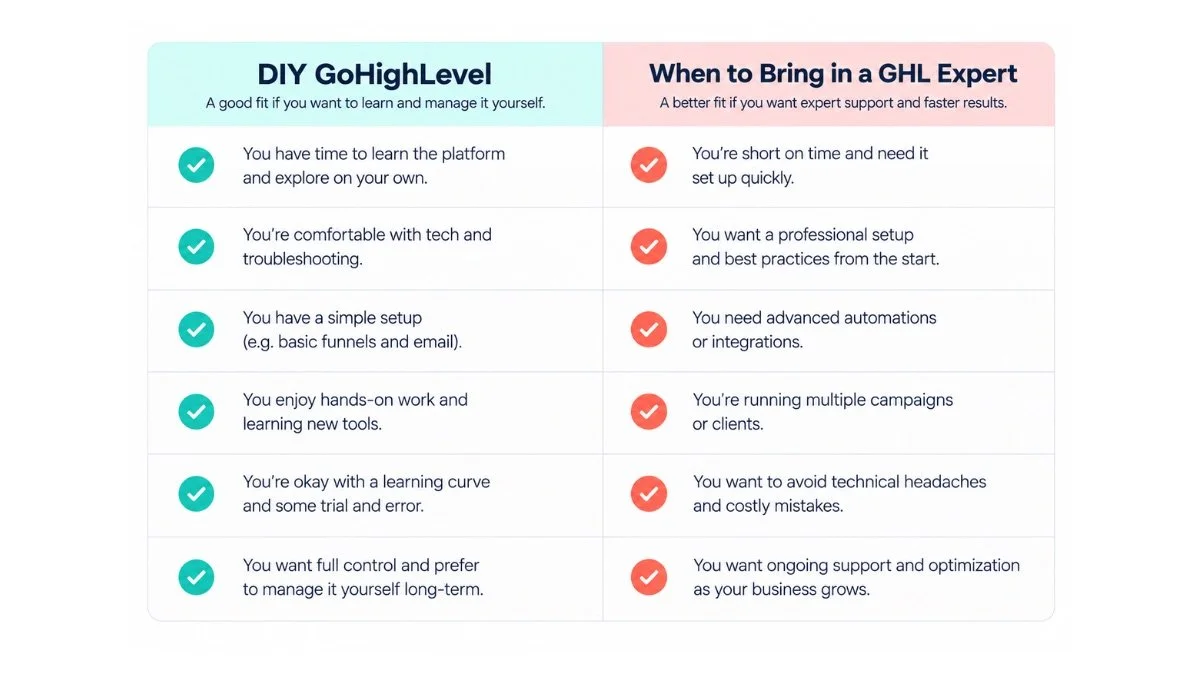
DIY can be realistic for a business with a small setup: one basic CRM, a clear pipeline, one funnel, one calendar, and one or two simple workflows. I usually tell owners that the question is not whether they are capable of learning GoHighLevel. It is whether maintaining it is the best use of their time. If you can document the setup, test changes, and keep ownership clear without neglecting sales or client work, managing it internally can make sense.
When does GoHighLevel become difficult for a business to manage?
Multiple workflows depend on the same contacts or triggers
Lead routing has several rules or teams
Automations break and no one knows why
The contact database is large or messy
Several calendars and appointment types must stay coordinated
Integrations affect critical business processes
Reporting no longer matches what the team needs
Maintenance is taking time away from sales, client service, operations, or strategy
What can a GoHighLevel expert help your business with?
At Smart VAs, our GoHighLevel experts support account setup, CRM organization, pipeline setup, forms and surveys, calendars, workflow implementation, testing, routine maintenance, documentation, and ongoing optimization. From my side as the specialist, I am responsible for understanding how the client's process is supposed to work and translating that into a system the team can actually use. I am not working in isolation either. A Client Success Partner helps coordinate priorities, communication, workload, and the wider support structure, which is especially useful when GHL touches other marketing or operational work.
I also see the value of structured systems support in clients such as John Moore, founder of 305 Spin. When recurring processes and reporting are handled more consistently, the internal team has more room for strategy, client relationships, and higher-value work. That is the outcome I am aiming for when I clean up a CRM or build an automation: not automation for its own sake, but less friction around the work the team has to repeat every day.
What Is the Best Way to Start Using GoHighLevel in Your Business?
The best starting point is not memorizing every button. When I train or hand off a system, I teach it in the same order the lead and the team experience it: CRM, pipeline, lead capture, calendar, workflow, funnel, reporting, and then more advanced automation. That way, every new feature has context instead of feeling like another tool to learn.
Leave complex integrations, advanced AI, SaaS mode, large multi-branch workflows, and custom development until the basics are reliable. I want the first system to accomplish one complete business goal: capture a lead, organize the contact, respond, book the next step, move the opportunity, and follow up without the owner having to remember every action manually. If that journey works cleanly, we have a foundation worth expanding.
Once that works, I expand carefully. I add the next workflow, integration, or report only when the current system is stable and the business has a clear reason for the change. At Smart VAs, ongoing GHL support is not about constantly adding complexity. A lot of the work is maintenance: reviewing what still makes sense, fixing what changed, documenting updates, testing again, and keeping the system aligned with how the business actually operates.
Using GoHighLevel for Your Business Without Letting It Become Another Full-Time Job
The easiest way to understand how to use GoHighLevel for your business is to stop treating it like a collection of features. This is the same way I approach a client account at Smart VAs: find one process that is taking too much time or allowing leads to fall through, map what should happen, build the CRM around it, connect the lead-capture point, automate the repeatable steps, and test the result. Then expand only when the first system is stable.
For a simple setup, you may be able to manage GoHighLevel yourself. For a growing business with multiple workflows, funnels, calendars, campaigns, and integrations, the harder part is usually ownership and maintenance. Someone has to notice when a field changes, a workflow starts overlapping another one, a calendar connection breaks, or reporting no longer reflects the real sales process. Whether a GHL VA or in-house support makes more sense depends on how much ongoing work exists, how specialized it is, and whether the business wants dedicated internal ownership or flexible external capacity.
Smart VAs works as a fully managed virtual assistant team, so my GHL work can sit alongside the other specialist support a client may need instead of becoming another disconnected vendor relationship. From my perspective, that matters because CRM and automation rarely live in a vacuum. A form may connect to a campaign, a workflow may depend on email or SMS, a funnel may need design or copy changes, and reporting may affect marketing decisions. The goal is still simple: build a system the team understands, trusts, and can keep improving as the business grows.
Smart Virtual Assistant
👍🤵
Smart Virtual Assistant 👍🤵
What if you could reclaim 40 hours this month?
Find out inside this free guide.
Frequently Asked Questions
-
Start with the business process you want to improve, then configure your business settings, CRM, and one sales pipeline around it. Connect a form or calendar, build one simple workflow, and test the full lead journey. Do not configure every feature immediately. A small working system is easier for your team to use and maintain.
-
ItemThe basics are learnable, but the platform can feel complex because many features connect to one another. Business owners usually have an easier time when they focus first on CRM, pipelines, calendars, forms, and one workflow, then delegate or add advanced automation only when the basic system is reliable. description
-
Use contact records to store the lead and customer information your team needs, then create opportunities in a pipeline that mirrors your real sales process. Assign owners, track activity, create tasks, and use workflows to support follow-up. Keep fields, tags, and stages simple enough for the team to use consistently.
-
Build a landing page around one conversion goal, add a form, calendar, or call to action, connect the submission to the CRM, create the thank-you or next step, attach the follow-up workflow, test the full journey, and only then publish.
-
Choose a clear trigger, define any conditions, add the actions that should follow, include wait steps or branches when needed, and set a stop condition. Test with a sample contact before going live. Your first automation should solve one real repetitive task rather than several unrelated problems.
-
Yes. A small business can use GoHighLevel for lead capture, CRM, follow-up, appointment booking, and simple funnels without using every advanced feature. The best setup depends on your sales process, lead volume, communication channels, and whether the platform saves enough manual work to justify maintaining it.
-
You do not need to be a developer for basic CRM, forms, calendars, funnels, and workflows. You do need a clear process, patience, and careful testing. More complex routing, integrations, account structures, and troubleshooting may benefit from specialist support so the business is not relying on trial and error.
-
Consider specialist help when workflows overlap, lead routing is complex, the CRM is disorganized, several calendars or funnels need maintenance, integrations are affecting operations, or GoHighLevel is taking too much time away from sales, client work, and business strategy.
About the Author:
Ivan, GHL Expert, SmartVAs

Ivan is a dedicated GoHighLevel (GHL) Expert at Smart VAs who helps businesses streamline their operations and customer journeys. With deep expertise in system organization, workflow automation, and campaign administration, Ivan transforms complex business rules into organized, scalable CRM solutions that are easy for teams to use consistently.