Key Takeaways
Email marketing builds long-term trust when businesses treat permission as an ongoing responsibility, not a one-time signup.
Personalization works best when it feels useful, relevant, and respectful instead of invasive.
A trustworthy email strategy balances value, consistency, privacy, clear opt-outs, and honest expectations.
Automation can support better timing and relevance, but human review is still needed to protect tone and judgment.
Strong email list management includes segmentation, deliverability monitoring, compliance checks, and regular reporting.
Growing businesses often need a repeatable system, not random newsletters sent whenever someone has time.
ARE YOU STILL TRYING TO DO IT ALL?
Discover the SMART way to delegate without losing control—and finally free up your time.
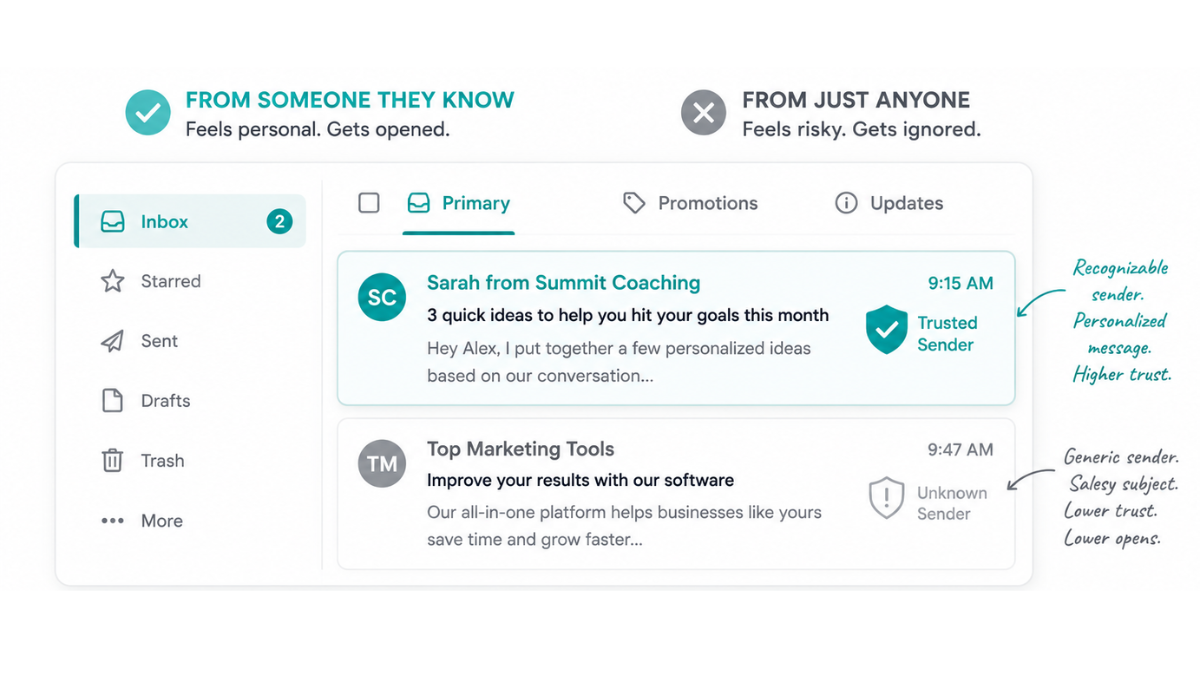
Email marketing best practices build trust when every message is clear, useful, permission-based, and consistent with what subscribers expected when they joined your list. The goal is not to send more emails. The goal is to send the right emails, to the right people, with enough respect that they keep wanting to hear from you.
I see this tension often with growing businesses. They know email can help them stay connected with leads and customers, but they also know people are tired of crowded inboxes, vague promotions, and messages that feel too automated.
That is why trust matters so much. Personalization can make email more useful, but it can also make people uncomfortable when it feels like a business knows too much or explains too little. A strong email marketing strategy has to balance relevance with respect.
In this guide, I will walk through the email marketing best practices that help businesses build customer trust over time. We will cover consent, privacy, personalization, email types, sending frequency, automation, reporting, and when it makes sense to work with a specialist for consistent execution.
What Makes Email Marketing a Trust-Building Channel?
Email is a trust-building channel because subscribers give you direct access to their inbox. Unlike ads or social posts, email starts with permission. That permission creates an opportunity to build a steady relationship, but it also creates responsibility. Every send either strengthens or weakens that trust.
When someone joins your list, they are making a small commitment. They are saying, “I am willing to hear from this business.” That is valuable, especially when social reach keeps changing and paid attention gets more expensive.
But permission does not last forever. A subscriber can ignore, delete, report, or unsubscribe when your emails stop feeling useful. That is why email should be treated as a relationship channel, not just a promotion channel.
For growing businesses, I like email because it gives you a way to stay close to your audience without relying completely on algorithms. It helps you nurture leads, educate customers, answer objections, and keep your brand present between buying moments.
A welcome email sets the tone for the relationship.
Educational emails show expertise without asking for a sale every time.
Customer updates keep people informed and reduce confusion.
Retention emails remind customers that the relationship does not end after purchase.
Feedback emails show that the business is listening, not just broadcasting.
Why Do Customers Distrust Personalized Marketing Emails?
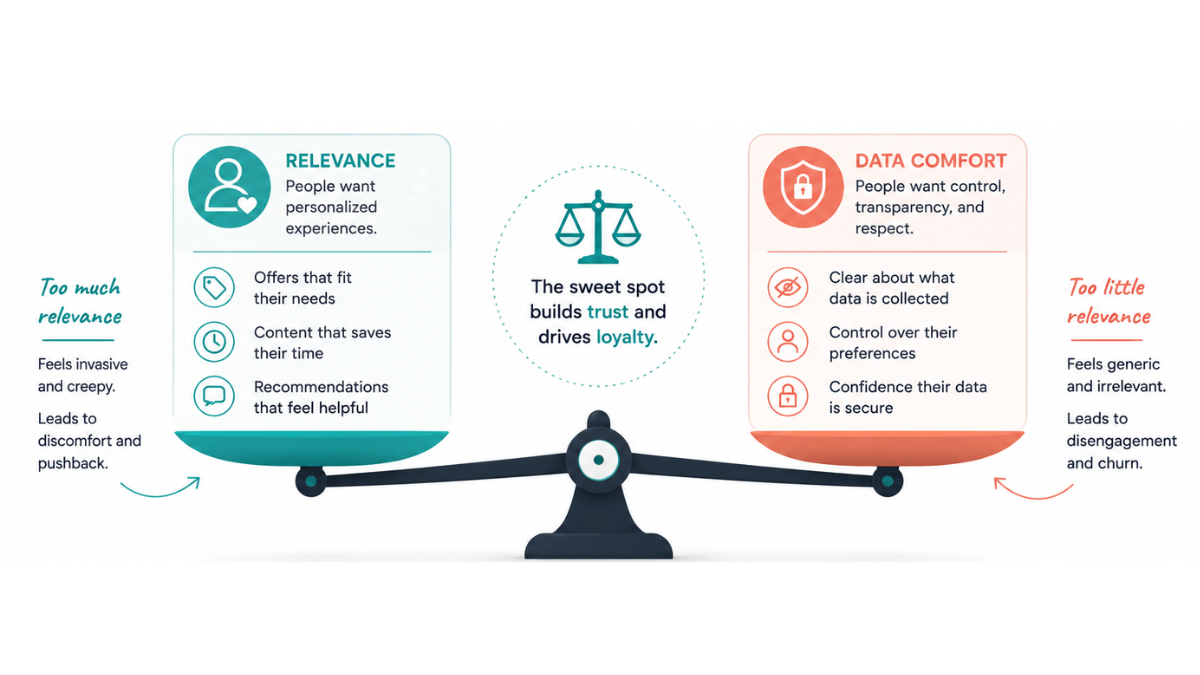
Customers distrust personalized emails when they do not understand how their data was collected or why it is being used. Relevance can improve the customer experience, but unexplained personalization can feel invasive. The difference is transparency, restraint, and whether the email genuinely helps the recipient.
The Pew Research Center has reported that many Americans feel they have little control over how companies collect and use their personal information. That matters for email marketing because personalization depends on data, and data use is exactly where customer suspicion often begins.
This does not mean businesses should stop personalizing emails. It means personalization has to feel earned. Using a first name, purchase history, location, or interest category can be helpful when it improves the message. It becomes uncomfortable when it feels too specific, too sudden, or poorly explained.
A simple test I use is this: would the subscriber immediately understand why they received this email? If the answer is no, the message may need clearer context before it goes out.
Helpful personalization: recommending content based on an opt-in preference.
Helpful personalization: sending onboarding tips after someone downloads a resource.
Risky personalization: referencing browsing behavior too directly without context.
Risky personalization: acting like a subscriber has a deeper relationship with the brand than they do.
How Do You Build Trust Through Consent and Privacy Practices?
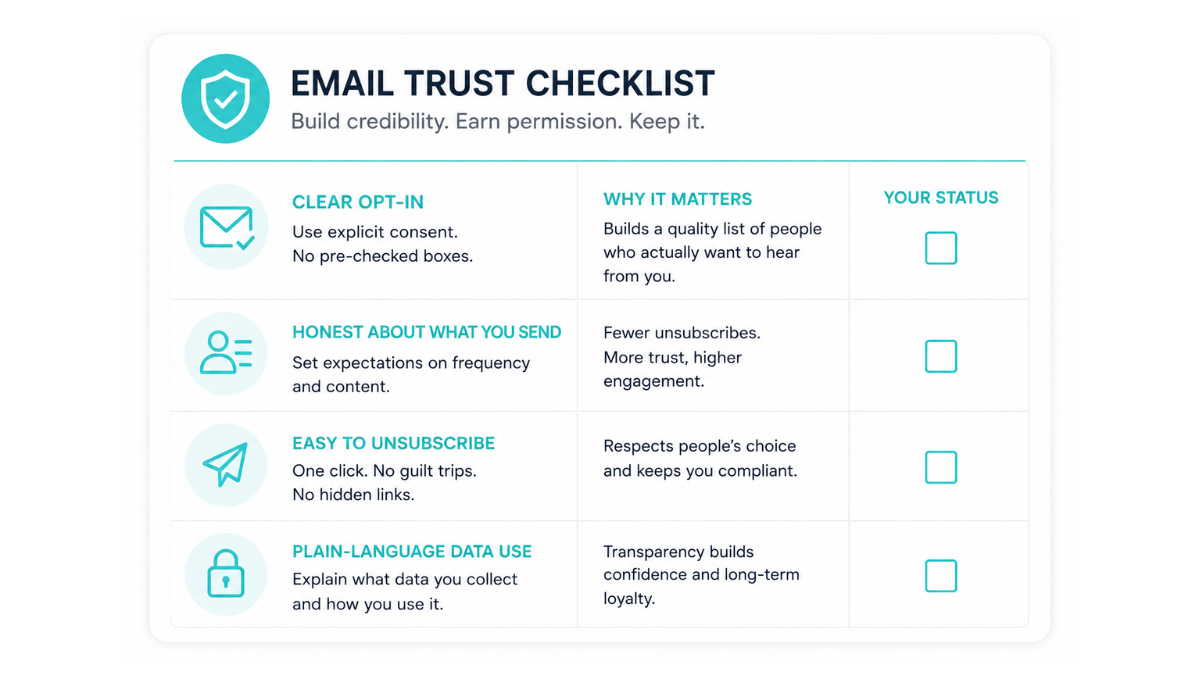
Trust starts before the first campaign is sent. Clear consent, honest expectations, and simple unsubscribe options show subscribers that your business respects their inbox. Compliance matters, but trust goes beyond legal minimums. People should know what they are signing up for and how to leave easily.
Consent should be specific. If someone signs up for a weekly newsletter, do not quietly add them to every promotional sequence you have. If they download a guide, explain whether they will also receive follow-up emails.
The FTC CAN-SPAM compliance guide explains that commercial emails need truthful header information, honest subject lines, a physical postal address, and a clear way to opt out. Those rules are not just legal boxes to check. They are basic signals of respect.
I also recommend using plain language on signup forms. Instead of “Submit,” say what happens next. For example: “Get the weekly growth email” is clearer than a generic form button.
Use clear opt-in language at signup.
Avoid pre-checked boxes or buried consent language.
Tell people what type of emails they will receive.
Make the unsubscribe link easy to find.
Remove unsubscribed contacts promptly.
Protect subscriber data and limit access to people who need it.
How Should You Segment and Personalize Emails Without Feeling Invasive?
Segment and personalize emails by using information subscribers reasonably expect you to have. Keep the focus on relevance, not surveillance. The best personalization helps people find the next useful step, while the worst personalization makes them wonder how much your business knows about them.
Segmentation does not have to be complicated. A small business can start with basic groups such as new leads, active customers, past customers, event attendees, or people who downloaded a specific resource.
Once the list grows, you can add behavioral segments. These might include people who clicked a pricing page, opened several educational emails, abandoned a form, or have not engaged in several months.
The key is to personalize with purpose. Do not use every data point just because it exists. Use the data that helps the subscriber receive something more useful.
| Personalization Type | Trust-Building Use | What to Avoid |
|---|---|---|
| Lifecycle Stage | Send welcome, nurture, onboarding, or win-back emails based on relationship stage. | Sending the same sales email to everyone. |
| Interests | Share content related to what the subscriber requested or clicked. | Referencing behavior in a way that feels too personal. |
| Customer Status | Give customers relevant updates, tips, or reminders. | Pretending the email is personal when it is clearly automated. |
| Location | Share local updates when relevant. | Using location data when it does not improve the message. |
What Types of Emails Should Be Part of a Trust-Building Program?

A trust-building email program includes more than promotions. It should welcome new subscribers, educate them, confirm important actions, ask for feedback, re-engage inactive contacts, and recognize important customer moments. Each type of email has a different job in the customer relationship.
The mistake I see most often is that businesses only email when they want something. That trains the audience to expect a pitch every time your name appears in the inbox.
A healthier email program gives before it asks. It helps subscribers understand the problem, compare options, make decisions, use the service better, or stay connected after purchase.
Welcome emails create the first impression and set expectations.
Educational emails help subscribers solve small problems and understand your expertise.
Newsletter emails keep the relationship active and consistent.
Transactional emails confirm that the business is reliable and organized.
Feedback emails make the relationship feel two-way.
Win-back emails give inactive contacts a respectful reason to re-engage.
Milestone emails recognize customer progress, anniversaries, or important moments.
How Often Should You Email Customers Without Damaging Trust?
Most small businesses can start with one to four useful emails per month, then adjust based on engagement, unsubscribes, replies, and customer behavior. Frequency matters less than expectation. Sending consistently builds trust, while disappearing for months and then flooding inboxes usually breaks it.
I would rather see a business send one strong email every two weeks than three rushed emails in one week followed by silence. Consistency teaches subscribers what to expect from you.
The right cadence depends on the audience. A B2B professional services firm may need fewer, deeper emails. An ecommerce brand may send more often because buying moments are more frequent.
Watch behavior instead of guessing. If unsubscribes and spam complaints rise after increasing frequency, that is a signal. If replies, clicks, and conversions improve, the cadence may be working.
Can Automation and AI Personalization Still Feel Human?
Automation and AI can still feel human when they support timing, relevance, and consistency without removing judgment. The risk is not automation itself. The risk is sending messages no one has reviewed, using awkward personalization, or letting a workflow continue after it no longer matches the customer relationship.
Automation is helpful for welcome sequences, lead nurture, abandoned forms, follow-ups, re-engagement campaigns, and customer reminders. It saves time and makes sure important messages do not fall through the cracks.
AI can support drafting, subject line testing, segmentation ideas, and reporting summaries. But it should not replace human review. Tone, context, empathy, and brand judgment still matter.
This is where CRM and email automation support becomes valuable for many growing businesses. A specialist can help build workflows, check logic, monitor results, and make sure automation still feels aligned with the brand.
Use automation to deliver the right message at the right time.
Review automated emails regularly for tone and accuracy.
Pause workflows when offers, pricing, or customer context changes.
Avoid fake personal language that feels manufactured.
Keep a real reply path so customers can respond when needed.
What Email Marketing Habits Quietly Break Customer Trust?
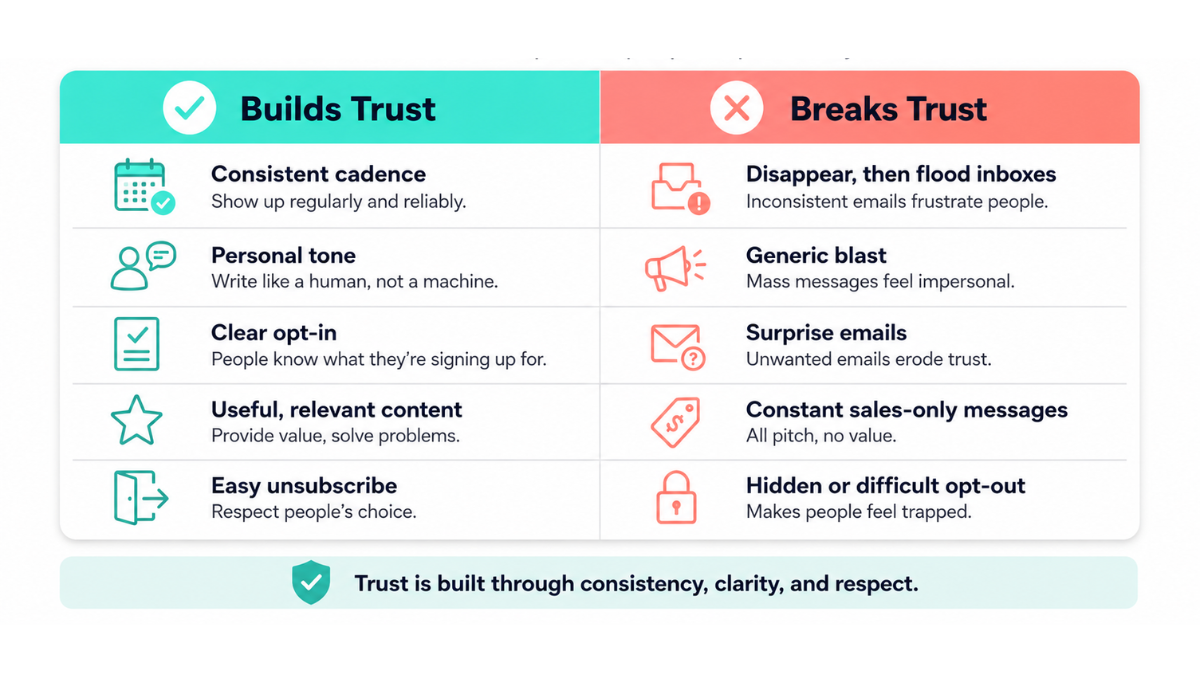
Customer trust breaks when email feels careless, excessive, misleading, or disconnected from the relationship. The most damaging habits are often quiet ones: unclear consent, inconsistent cadence, too many sales messages, generic personalization, ignored feedback, and automation that continues after it stops making sense.
These habits may not cause a big problem right away. They usually erode trust slowly. Open rates drop, replies disappear, unsubscribes increase, and the brand starts feeling less welcome in the inbox.
I tell clients to treat every email as a small brand interaction. A confusing subject line, broken link, irrelevant offer, or tone-deaf follow-up may seem minor. Repeated over time, those details shape how people see your business.
| Habit | Why It Breaks Trust | Better Practice |
|---|---|---|
| Over-sending | Subscribers feel pressured or overwhelmed. | Set a consistent cadence and monitor unsubscribes. |
| Only Selling | The relationship feels one-sided. | Balance offers with education, updates, and helpful resources. |
| Generic Personalization | The email feels automated without value. | Use segments that match real customer needs. |
| Hard-to-Find Unsubscribe | People feel trapped. | Make opt-out simple and respectful. |
| Ignoring Feedback | Customers feel unheard. | Review replies, surveys, and support themes. |
How Do You Measure Whether Your Emails Are Building Trust?
You measure trust by looking beyond opens and clicks. A healthy email program tracks unsubscribes, spam complaints, replies, retention, repeat purchases, referrals, deliverability, and customer feedback. These signals show whether people still welcome your emails or are slowly pulling away from the relationship.
Opens and clicks still matter, but they do not tell the full story. A subject line can earn a click and still disappoint the reader if the email does not deliver what it promised.
Spam complaints are especially important because they show a direct trust problem. If subscribers mark emails as spam, they are not just disengaged. They are saying the message felt unwanted.
Deliverability also belongs in this conversation. Inbox placement is not only a technical issue. It is influenced by sender reputation, engagement, complaints, list quality, and whether your audience continues to interact with your emails.
| Metric | What It Shows | Why It Matters |
|---|---|---|
| Unsubscribe Rate | How many people no longer want your emails. | Reveals cadence, relevance, or expectation issues. |
| Spam Complaint Rate | How many people consider the email unwanted. | Signals a trust and deliverability problem. |
| Reply Rate | How often people respond directly. | Shows whether the email feels human and useful. |
| Repeat Purchase or Retention | Whether email supports ongoing customer value. | Connects email to relationship health. |
| Deliverability | Whether emails reach the inbox. | Reflects list quality and sender reputation. |
Should You Manage Email Marketing In-House or Work With a Specialist?
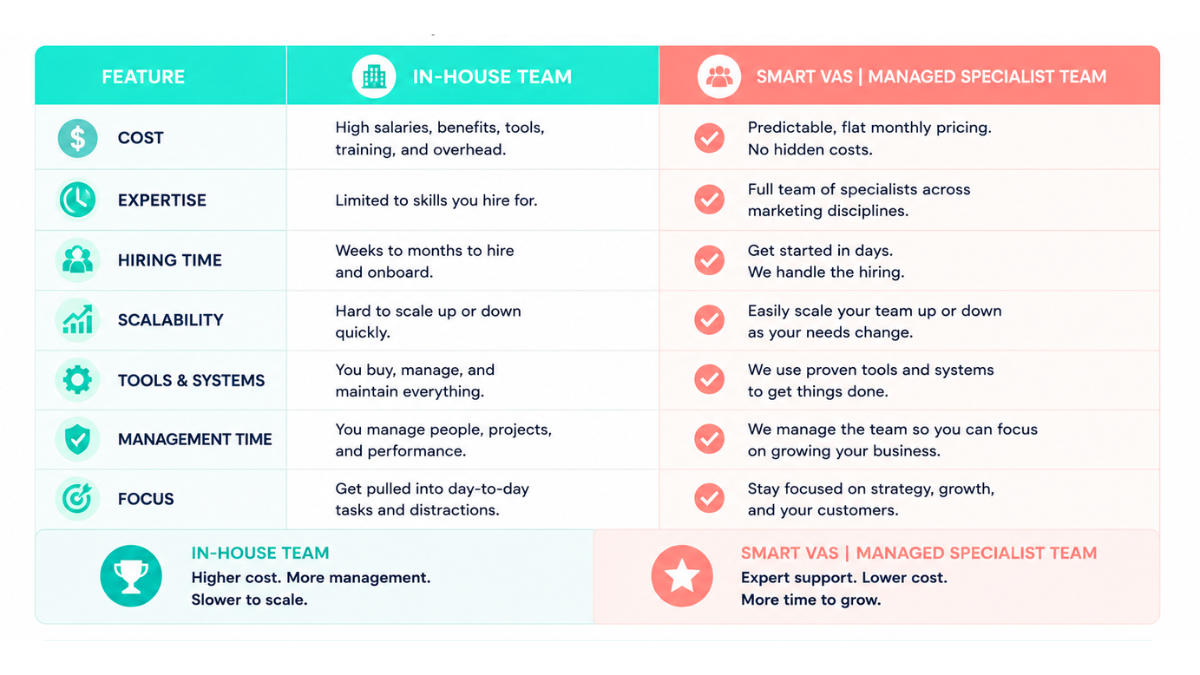
You can manage email marketing in-house if you have the time, tools, and process discipline to maintain it consistently. A specialist becomes valuable when email depends on segmentation, automation, deliverability, CRM updates, reporting, content quality, and regular optimization that your internal team cannot sustain.
The question is not only “Can we write an email?” Most businesses can. The harder question is whether someone can manage the system behind it every month without dropping other growth priorities.
Strong email marketing touches list hygiene, consent records, campaign planning, copy, design coordination, automation logic, testing, reporting, and customer journey mapping. When those tasks are scattered, email becomes inconsistent.
At Smart VAs, we support growing businesses through a fully managed team of specialists. That means the business can keep ownership of its strategy and customer relationships while getting consistent execution support behind the scenes.
For email specifically, CRM and email automation support can help with workflows, list segmentation, follow-up sequences, reporting, and customer journey organization. Professional blog writing support and social media management support can also help turn one strong email topic into a blog article, LinkedIn post, or social campaign.
I see this in client work at Smart VAs, too. On our reviews page, Gabe, a digital marketing business owner, shares that he relies on our team for content creation, video editing, podcast support, social media management, email marketing, and website updates. That matters because trusted email rarely works alone. It usually connects to content, CRM organization, social touchpoints, and the follow-up systems around the customer relationship.
| Factor | In-House Only | Specialist Support | Managed Specialist Team | What It Means for Trust |
|---|---|---|---|---|
| Time Required | Owned internally | Shared with a dedicated Specialist | Structured across the support team | Emails are less likely to be rushed or forgotten. |
| Consistency | Depends on internal bandwidth | More repeatable | Built into recurring workflows | Subscribers receive a steadier experience. |
| Compliance Oversight | Often informal | Reviewed by role owner | Supported through process and documentation | Consent, unsubscribe, and list hygiene get more attention. |
| Reporting Clarity | May be irregular | Tracked consistently | Reviewed with broader customer journey context | Decisions come from data, not guesswork. |
| Content Support | Limited by internal time | Supported as needed | Can connect with writing and content workflows | Emails stay useful instead of only promotional. |
How Can Smart VAs Help Businesses Build a More Trusted Email Program?
Smart VAs is a fit when a business has marketing goals but lacks the time or internal bandwidth to execute email consistently. We help organize the work behind the inbox, from CRM workflows and campaign support to content coordination, reporting, and ongoing communication structure.
I do not believe every business needs a massive marketing department to build better customer relationships. But I do believe a business needs a reliable system. Email trust comes from consistency, and consistency requires ownership.
That ownership may include planning the calendar, preparing campaign drafts, segmenting contacts, checking links, organizing CRM tasks, reviewing reporting, and making sure no follow-up slips through the cracks.
If your email marketing is moving slower than your business, it may be time to look at how to build your own remote team or whether there are signs it is time to hire remote admin support for the operational pieces that keep campaigns moving.
Email also works better when it connects with the rest of your marketing. A trust-building email program may support SEO vs PPC decisions, repurpose content, or coordinate with website updates and outsourcing web development when the customer journey needs improvement.
Campaign planning and calendar support
CRM organization and customer journey support
Email workflow and automation support
Newsletter coordination and formatting
Content repurposing across blog and social channels
Reporting support for engagement, unsubscribes, and follow-up activity
Coordination with your existing marketing tools and internal team
Ready to Build Customer Trust Through Better Email Marketing?
Email trust is not built by one clever subject line. It is built through every consent choice, every useful email, every respectful unsubscribe, and every automated message that still feels like a real person cared enough to review it.
If your business has outgrown random newsletters and inconsistent follow-ups, Smart VAs can help you build a more organized support structure for email and CRM execution. Delegation is not just a task. It is a strategy for buying back your time and protecting the relationships that fuel growth.
Schedule a discovery call with Smart VAs to explore the right support structure for your email marketing and customer relationship goals.
Smart Virtual Assistant
👍🤵
Smart Virtual Assistant 👍🤵
What if you could reclaim 40 hours this month?
Find out inside this free guide.
Frequently Asked Questions
-
The most important email marketing best practices are clear consent, useful content, consistent sending, honest subject lines, easy unsubscribe options, respectful personalization, and regular list management. Trust grows when subscribers understand why they receive your emails and feel the content is helpful instead of intrusive.
-
Many small businesses can start with one to four valuable emails per month, then adjust based on engagement, replies, unsubscribes, and spam complaints. Consistency matters more than volume. A predictable cadence builds trust, while long silence followed by heavy promotion can damage the relationship.
-
Personalization helps when it makes the email more relevant and easier to use. It hurts when it feels invasive, unexplained, or overly specific. The safest approach is to personalize around clear preferences, lifecycle stage, or customer needs while avoiding details that may make subscribers uncomfortable.
-
Trust breaks when businesses over-send, hide unsubscribe options, use misleading subject lines, ignore customer feedback, over-automate without review, or send generic messages that do not match subscriber interests. These habits may not cause immediate damage, but they slowly reduce engagement and inbox trust.
-
AI-powered email marketing can feel trustworthy when humans review the strategy, tone, segmentation, and final message before sending. AI can help draft, summarize, and optimize timing, but it should not replace judgment. Subscribers still expect clear, relevant, and respectful communication from the business.
-
Trust-focused email metrics include unsubscribe rate, spam complaint rate, reply rate, retention, repeat purchases, referral activity, deliverability, and customer feedback. Opens and clicks are useful, but they do not show the full relationship. Healthy email programs track whether subscribers continue to welcome the brand.
About the Author:
Kristy Yoder, Founder

Kristy Yoder is the Founder of Smart VAs, a virtual assistant agency that helps entrepreneurs grow through reliable administrative and digital marketing support. With extensive experience building and managing remote teams, she specializes in delegation, operational efficiency, and scalable business growth.
Passionate about helping business owners reclaim their time, Kristy leads Smart VAs in connecting entrepreneurs with skilled virtual professionals who provide dependable support and contribute to long-term success.